32-Bit vs 64-Bit Processors Explained in Detail
📅 2026⏱ 10 min read 🖥 Computer Architecture
A complete, technically grounded guide to understanding the fundamental differences between 32-bit and 64-bit processor architectures — from memory limits to performance, software compatibility, and real-world implications.
Let’s dive deeper.
1) What Does “Bit” Actually Mean?
When we say a processor is “32-bit” or “64-bit,” we’re referring to the width of the processor’s registers — the tiny, ultra-fast storage locations built directly into the CPU where arithmetic and logical operations are performed.
A bit (binary digit) is the smallest unit of data in computing, holding a value of either 0 or 1. A 32-bit processor works with data in chunks of 32 bits at a time, while a 64-bit processor handles 64-bit chunks. This seemingly small difference has enormous downstream effects on everything from addressable memory to processing speed.
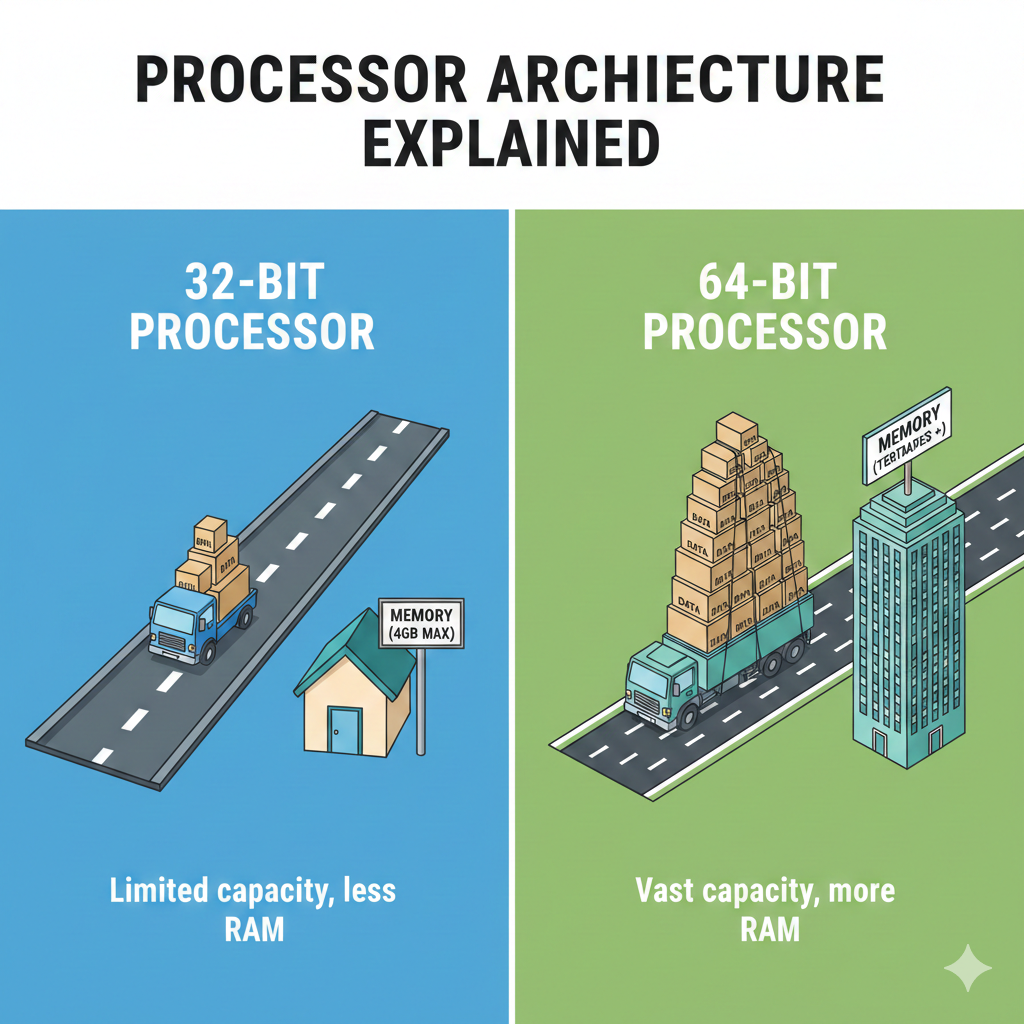
Think of it this way: Imagine a highway. A 32-bit processor has a 32-lane highway for data to travel — a 64-bit processor doubles that to 64 lanes, allowing far more information to move simultaneously with every clock cycle.
2³²
States in 32-bit register
2⁶⁴
States in 64-bit register
4 GB
Max RAM (32-bit)
16 EB
Theoretical Max RAM (64-bit)
2) A Brief History
The 32-Bit Era
32-bit processors dominated consumer computing from the early 1980s through the early 2000s. Intel’s 80386 (1985) was the first mainstream 32-bit x86 processor, enabling DOS and later Windows to address up to 4 GB of RAM. Through the 1990s, processors like the Intel Pentium and AMD K6 cemented 32-bit as the industry standard. Microsoft’s Windows 95, 98, and XP were all 32-bit operating systems.
The 64-Bit Transition
The shift began in earnest in 2003 when AMD introduced the Athlon 64 — the first mainstream 64-bit consumer processor, using the x86-64 (also called AMD64) instruction set. Intel followed with their own EM64T extensions. Apple transitioned to 64-bit with the G5 PowerPC chips and later Intel Core 2 processors. By the early 2010s, 64-bit had become the universal standard for desktops, laptops, and servers. In 2017, Apple began requiring all iOS apps to be 64-bit only — signaling the end of the 32-bit era on mobile.
Note: Today, virtually every modern processor — from Intel Core i-series and AMD Ryzen to Apple Silicon (M-series) — is 64-bit. 32-bit architectures live on in embedded systems, IoT devices, and microcontrollers.
3) The Memory Address Space — The Biggest Difference
This is the single most consequential difference. A processor’s address bus determines how much RAM it can see and use, and the width of that address bus is tied directly to whether the architecture is 32 or 64-bit.
32-bit: The 4 GB Wall
A 32-bit processor can generate 2³² unique memory addresses — which equals exactly 4,294,967,296 addresses, or 4 GB. This is the hard ceiling for physical RAM. In practice, due to memory-mapped hardware (graphics cards, system devices), the usable RAM was often only around 3 to 3.5 GB even if you installed a full 4 GB.
For the 1990s and early 2000s — when typical PCs had 64 MB to 512 MB of RAM — this was perfectly adequate. But as applications grew hungrier, the wall became a serious bottleneck.
64-bit: Virtually Unlimited
A 64-bit processor can theoretically address 2⁶⁴ unique locations — approximately 18.4 exabytes (EB) of RAM. In practice, modern operating systems and hardware cap this at much lower but still enormous amounts. Windows 11 Pro supports up to 2 TB, Windows Server supports up to 24 TB, and Linux servers routinely run with hundreds of gigabytes of RAM.
This is why 64-bit architecture was essential for video editing, 3D rendering, scientific simulation, databases, and virtualization — all workloads that benefit enormously from large amounts of RAM.
Real-world example: Running a 4K video editing project in Adobe Premiere Pro may require 32+ GB of RAM for smooth playback and rendering. This is simply impossible on a 32-bit system — not because the software can’t run, but because the hardware cannot address that memory.
4) Register Width and Data Processing
Registers are the CPU’s working memory — where it holds the numbers it’s currently crunching. The wider the register, the more data the CPU can process in a single instruction.
A 32-bit register can hold integers up to 2³²−1 = 4,294,967,295. A 64-bit register can hold values up to 2⁶⁴−1 ≈ 18.4 quintillion. For applications dealing with large numbers — cryptography, scientific computing, financial calculations, big data — this native 64-bit arithmetic is far more efficient than the 32-bit approach of breaking large numbers into multiple smaller operations.
Additionally, 64-bit CPUs typically ship with more general-purpose registers. The x86-64 architecture doubled the number of general-purpose registers from 8 (in 32-bit x86) to 16, reducing how often the CPU must spill values to slower main memory — a significant performance boost.
5) Performance Comparison
The question “is 64-bit faster?” has a nuanced answer: it depends on the workload.
When 64-bit Is Faster
For tasks that require large memory datasets, 64-bit integer math, or benefit from more registers, 64-bit wins clearly. Database queries, video encoding, 3D modeling, machine learning inference, and scientific computation all run meaningfully faster on 64-bit architectures.
When 32-bit Can Be Competitive
For simple, memory-light workloads, a 32-bit program may run as fast — or occasionally even slightly faster — than its 64-bit counterpart. Why? Because 64-bit pointers are twice as large (8 bytes vs. 4 bytes), slightly increasing memory usage and potentially reducing cache efficiency on simple loops. This is rarely significant in practice, but it’s why some embedded systems still use 32-bit architectures deliberately.
The verdict: For modern computing, 64-bit is universally better for general use. The performance advantages — more RAM, wider registers, more general-purpose registers, native 64-bit math — vastly outweigh the marginal pointer-size overhead in all realistic workloads.
6) Side-by-Side Comparison
| Feature | 32-bit | 64-bit |
|---|---|---|
| Register Width | 32 bits | 64 bits |
| Max Addressable RAM | 4 GB (theoretical); ~3–3.5 GB (practical) | 18.4 EB (theoretical); up to 2–24 TB (OS-limited) |
| General-Purpose Registers (x86) | 8 registers | 16 registers |
| Pointer Size | 4 bytes | 8 bytes |
| Max Integer (native) | ~4.3 billion | ~18.4 quintillion |
| Software Compatibility | Runs only 32-bit software | Runs both 32-bit and 64-bit software |
| OS Support | Windows XP 32-bit, older Linux | Windows 10/11, modern Linux, macOS |
| Security Features | Limited (no NX bit support natively) | NX/XD bit, ASLR, DEP, hardware security extensions |
| Performance (heavy workloads) | Bottlenecked by memory ceiling | Superior for data-intensive tasks |
| Use Cases Today | Embedded systems, IoT, microcontrollers | Desktops, laptops, servers, smartphones |
7) Operating Systems and Software Compatibility
One of the great engineering achievements of the x86-64 transition was backward compatibility. A 64-bit processor running a 64-bit OS can still execute 32-bit applications natively through a compatibility layer. On Windows, this is handled by WoW64 (Windows-on-Windows 64-bit); on Linux and macOS, 32-bit support exists through multilib configurations.
However, the reverse is not true — a 32-bit OS cannot run 64-bit software. And even when running 32-bit apps on a 64-bit OS, each individual 32-bit process is still limited to 4 GB of virtual address space (often only 2 GB by default due to OS kernel reservations).
Apple removed 32-bit app support entirely with macOS Catalina (10.15) in 2019. This was a clear signal: the 32-bit era for consumer software is over.
8) Security Implications
64-bit architectures brought meaningful security improvements alongside their performance gains.
NX / XD Bit
The No-Execute (NX) or Execute Disable (XD) bit is a hardware-level security feature that marks certain areas of memory as non-executable. This directly counters buffer overflow exploits that try to inject and run malicious code. While technically possible to implement on 32-bit systems via PAE (Physical Address Extension), it became standard and reliable on 64-bit hardware.
ASLR — Address Space Layout Randomization
ASLR randomizes the memory addresses used by a program, making it harder for attackers to predict where to inject code. On 32-bit systems, the limited address space made ASLR only weakly effective — there just weren’t enough possible locations to randomize meaningfully. On a 64-bit system with its vast address space, ASLR becomes dramatically more effective, as attackers face an astronomically larger range of potential locations.
More Robust Cryptography
Modern cryptographic operations (AES, SHA-256, RSA) work on large integers. Native 64-bit arithmetic allows these calculations to execute with fewer instructions and without the overhead of multi-word arithmetic required on 32-bit CPUs, improving both speed and implementation simplicity.
9) 32-bit Still Lives On
Despite being largely supplanted in consumer computing, 32-bit architectures are far from extinct. They remain the dominant choice in the embedded and IoT worlds — for good reason.
Processors like the ARM Cortex-M series (32-bit) power billions of microcontrollers in automotive systems, industrial controllers, smart appliances, medical devices, and sensor networks. For these applications, a 32-bit processor offers the right balance: sufficient compute power, low cost, low power consumption, and minimal complexity.
When a thermostat, a pacemaker controller, or an automotive ABS module only needs to handle a few kilobytes of data, a 64-bit processor would be overkill — burning more power and costing more for zero real benefit.
ARM’s role: ARM Holdings designs both 32-bit (Cortex-M, Cortex-A32) and 64-bit (Cortex-A64 / AArch64) processor cores. Apple’s M-series chips, modern Android phones, and AWS Graviton servers all run on 64-bit ARM. But hundreds of millions of embedded ARM Cortex-M chips are 32-bit — running in everything from smart watches to car dashboards.
10) Which Should You Use?
For virtually every modern computing scenario — desktops, laptops, smartphones, servers, cloud VMs — 64-bit is the only meaningful choice. You get more RAM, better performance on demanding workloads, richer security features, and full compatibility with modern software ecosystems.
The only scenario where 32-bit makes sense today is embedded and low-power systems where cost, energy efficiency, and hardware simplicity outweigh the need for large memory or heavy computation.
If you’re a developer, compile for 64-bit unless specifically targeting embedded hardware. If you’re a regular user, your modern PC, Mac, or phone is already 64-bit — and will remain so for the foreseeable future.
The Bottom Line
The shift from 32-bit to 64-bit processors was one of the most impactful transitions in computing history. It shattered the 4 GB memory ceiling, expanded native integer precision, improved security, and enabled the modern era of compute-intensive applications — from AI to 4K video to massive multiplayer gaming.
32-bit is not dead — it’s simply found its right-sized domain in embedded systems. Meanwhile, 64-bit continues to evolve, with wider SIMD units, deeper hardware security, and ever more powerful extensions that will shape computing for decades to come.