3D Touch Explained — What It Is & How It Works
Apple Technology Deep Dive
3D Touch Explained
The pressure-sensitive technology that redefined how humans interact with touchscreens — what it is, how it works under the hood, and why it disappeared.
📱 iPhone 6s – iPhone XS🔬 Capacitive Sensing⚡ Haptic Engine👆 Peek & Pop🧲 Force Detection
1) Introduction :
What Is 3D Touch?
3D Touch is a pressure-sensitive touch technology developed by Apple and introduced with the iPhone 6s in September 2015. Unlike a standard capacitive touchscreen that detects only whether and where your finger touches the screen, 3D Touch detects how hard you press — adding a third dimension (depth or pressure) to touch input.
The technology allowed iPhones to distinguish between three categories of interaction: a light tap, a medium press called Peek, and a deeper press called Pop. This unlocked an entirely new layer of interaction that sat invisibly beneath the standard touch interface — context menus, content previews, shortcut actions, and pressure-sensitive drawing — all triggered by varying finger pressure.
Apple marketed 3D Touch as a fundamental evolution of the touchscreen — the same kind of leap as going from clicking to multi-touch. Though it was eventually discontinued in favor of Haptic Touch starting with iPhone XR in 2018, 3D Touch represented one of the most ambitious interface innovations of the smartphone era.
2015 Year Introduced (iPhone 6s)
3 Pressure Levels Detected 290g Approx. Peek Force Threshold
2018 Last Device with 3D Touch (XS)
2) History :
The Road to 3D Touch
2007 :
iPhone & Capacitive Touch Debut
Apple introduced multi-touch capacitive screens, replacing resistive touchscreens that required stylus pressure. The new paradigm responded to light touch — but had no pressure sensitivity.
2013 :
Apple Acquires PrimeSense
Apple acquired depth-sensing company PrimeSense (makers of the original Kinect sensor technology) for ~$345M, signaling heavy investment in depth and spatial sensing.
2014 :
Force Touch on Apple Watch & MacBook
Apple previewed pressure-sensitive touch with Force Touch on the Apple Watch and the 12-inch MacBook trackpad — a direct precursor to 3D Touch, now miniaturized into a watch and laptop.
Sept 2015 :
3D Touch Launches on iPhone 6s
3D Touch debuted with the iPhone 6s and 6s Plus. Apple described it as “the biggest thing since multi-touch” — adding pressure as a new dimension of touch input to a smartphone screen.
2018 – 2019 :
Gradual Deprecation
iPhone XR (2018) shipped without 3D Touch, replaced by long-press Haptic Touch. In 2019, Apple officially removed 3D Touch from iPhone 11, ending the era. iOS 13 made Haptic Touch match most 3D Touch functions.
3) Hardware :
The Hardware Inside 3D Touch
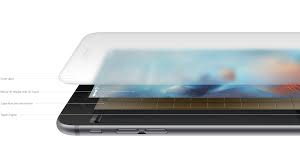
3D Touch is not a software trick — it required a complete hardware overhaul of the iPhone’s display stack. Apple engineered a custom sensor layer embedded directly within the display assembly, consisting of several sophisticated components working in precise coordination.
🖐️Finger / Touch Surface
Your fingertip applies varying force to the Gorilla Glass cover. The glass itself flexes imperceptibly — measured in micrometers — under different pressure levels.
🔵Cover Glass (Ion-Strengthened)
The glass bends nanometrically under force. This microscopic deformation changes the capacitance of the electrode array beneath — the key physical phenomenon 3D Touch exploits.
⚡Capacitive Electrode Array (Force Sensor Layer)
A custom-designed grid of 96 electrodes is embedded in the display. Each electrode measures the tiny change in electric field caused by the glass deflecting closer to or farther from it — directly proportional to applied force. This is the core 3D Touch sensor.
🟡Multi-Touch Capacitive Layer
The standard touch detection layer identifies finger position (X, Y coordinates) via mutual capacitance, operating simultaneously with the force sensor layer to provide full 2D + force data.
🖥️OLED / Retina Display Panel
The display itself sits beneath the sensor stack. In iPhone models using OLED (6s used LCD), the display’s flexibility aided in the sensor design by allowing more consistent deflection measurements.
🔌Taptic Engine (Haptic Actuator)
Not a sensor but crucial to the experience — a linear actuator that creates precise, distinct physical feedback patterns for Peek and Pop events, making pressure interactions feel tangible and real.
🧠Apple A-Series Processor
The application processor continuously processes electrode data, compensates for temperature and grip variations, and makes real-time decisions about whether a touch event qualifies as a tap, Peek, or Pop.
The Electrode Grid in Detail
The 96-electrode array in 3D Touch is arranged in a grid across the entire display area. Each electrode is part of a capacitor — measuring the tiny capacitance change when the glass flexes above it. By reading the delta across all 96 electrodes simultaneously, the processor can calculate not just total force, but also the distribution of force across the fingertip, enabling the system to distinguish between a large, blunt press and a focused, pointed press.
How sensitive is it? The 3D Touch sensor can detect deflections in the display glass of less than the width of a human hair — under 50 micrometers. This microscopic flex is enough to produce a measurable change in capacitance, which is translated into a precise force value by the signal processing system.
4) Physics & Signal Processing :
How 3D Touch Actually Works
The physical principle underlying 3D Touch is remarkably elegant: it exploits the relationship between capacitance and distance. Capacitance increases as two conductors move closer together — and decreases as they move apart.
Pressure → Capacitance Change
No touch
Light tap
Peek (medium)
Pop (deep)
Physics Principle
Capacitance C = ε × (A ÷ d)
ε = permittivity
A = electrode area
d = gap distance
As you press harder, d decreases → capacitance increases → processor reads higher force value.
Finger applies pressure to the glass surface
As force increases, the display glass deflects microscopically toward the electrode layer beneath it. The stiffer the material and the stronger the press, the more deflection occurs — even if completely invisible to the naked eye.
Electrode array detects capacitance change
The 96-electrode grid continuously measures self-capacitance. As the glass moves closer, each electrode under the touch point reads a higher capacitance value. The entire grid is scanned rapidly — many times per second — giving a real-time force map.
Signal processor separates position from force
The standard multi-touch layer provides X/Y position data. The force sensor layer provides Z-axis (pressure) data. A dedicated processor combines these streams into a unified input event with both location and force magnitude.
Compensation algorithms correct for variables
Temperature affects capacitance readings (the display warms up during use), and each user holds the phone differently. Apple’s software applies real-time calibration and compensation to ensure consistent thresholds regardless of environmental conditions, finger size, or device temperature.
Force thresholds trigger interactions
The processed force value is compared against software-defined thresholds. A light tap is a normal touch event. Crossing the Peek threshold triggers a preview. Crossing the Pop threshold opens the content fully. Developers can access raw force values via UITouch.force for custom pressure-sensitive interactions.
Taptic Engine delivers haptic confirmation
The Taptic Engine — a linear resonant actuator — fires a precisely timed vibration pattern to confirm each force threshold crossing. This click-like sensation makes force interactions feel physical and tactile, even though the display glass barely moves.
5) Features & Use Cases :
3D Touch Features Explained
Peek & Pop — The Core Interaction
Peek was a light force press that showed a live preview of content without fully opening it. Press on a link in Safari and you’d see the webpage; press a message and you’d see its content; press a photo and it would expand. Releasing your finger dismissed the preview — you’d never left your current screen.
Pop was a deeper, firmer press that fully committed — it opened the previewed content entirely, exactly as if you’d tapped to navigate there. The transition was seamless and felt like physically “pushing through” the screen into the content.
⚡Quick Actions (Home Screen)
Pressing firmly on any app icon revealed a contextual menu of quick actions — “New Message”, “Take Selfie”, “Directions Home” — without opening the app. A massive time-saver for common tasks.
🔭Peek at Content
Press a link, email, or notification to preview it. A blurred overlay appeared with the content front and center — you could scroll within the preview, share it, or dismiss it without disturbing your current context.
🖊️Pressure-Sensitive Drawing
In Apple Notes and third-party apps, pressing harder produced a thicker, darker line — mimicking the behavior of real pens and pencils. Combined with the Apple Pencil, this enabled genuinely expressive digital art.
🎮Live Photos Preview
3D Touch on a Live Photo in the camera roll played back the captured motion. The force press felt like “pressing play” — a delightful interaction that made the feature intuitive without any visible controls.
⌨️Trackpad Mode
Force-pressing anywhere on the keyboard transformed it into a trackpad for text cursor positioning — one of the most beloved 3D Touch features, allowing precise cursor placement without your fat finger obscuring the text.
🔔Notification Expansion
Force-pressing a notification on the lock screen or notification centre expanded it to reveal full content and inline action buttons — reply, like, delete — without unlocking the phone or opening the app.
🎵App Switcher Gesture
A firm press on the left edge of the screen then sliding inward triggered the app switcher — faster than the home button double-press and accessible one-handed. Highly efficient navigation for power users.
🛠️Developer API Access
Developers had access to UITouch.force and UITouch.maximumPossibleForce in UIKit, enabling fully custom pressure-based interactions in games, creative tools, and productivity apps.
The Taptic Engine’s role:
3D Touch would have felt clinical without haptic feedback. Apple’s Taptic Engine delivers distinct “click” sensations for Peek (a soft click) and Pop (a firmer, double-click-like sensation), creating the perception of physical depth and mechanical response in what is actually a completely flat, stationary piece of glass. This is known as illusory haptics — your brain is convinced the screen clicked.
6) The Taptic Engine :
The Taptic Engine — Making Force Feel Real
The Taptic Engine is a Linear Resonant Actuator (LRA) — a tiny electromagnetic motor that moves a mass back and forth along a single axis with extreme precision and control. Unlike a traditional vibration motor (which spins an eccentric weight), an LRA can start and stop vibrating in under 10 milliseconds, enabling sharp, distinct tactile pulses rather than buzzing.
Apple engineers designed specific haptic patterns — called Haptic Primitives — for different UI events: a crisp, sharp click for a Peek threshold crossing; a slightly heavier, dual-pulse sensation for Pop; a subtle “thunk” for deleting items; gentle taps for scrolling past list boundaries. Each pattern is a precisely choreographed waveform delivered to the actuator.
Haptic waveform visualization — Peek click (red) → Pop click (purple)
Why this matters: Without the Taptic Engine, 3D Touch would feel like pressing on a dead surface with no feedback. Human touch perception is deeply tied to both tactile sensation and force feedback — the Taptic Engine’s haptic clicks make 3D Touch feel like a real button click, exploiting a well-studied perceptual phenomenon called pseudo-haptics.
7) Comparison :
3D Touch vs. Haptic Touch vs. Force Touch
| Feature | 3D Touch | Haptic Touch | Force Touch (Mac/Watch) |
|---|---|---|---|
| Mechanism | Capacitive force sensors — detects actual pressure/deflection | Time-based — long press duration only, no real force detection | Strain gauge sensors underneath trackpad or watch face |
| True Pressure Detection | Yes — measures actual force in real time | No — just a timed hold | Yes — genuine pressure measurement |
| Pressure Levels | Continuous (Peek ~290g, Pop ~500g, and everything between) | None — binary (held or not held) | Continuous on trackpad; two levels on Watch |
| Hardware Required | Custom 96-electrode force sensor layer in display | Standard touch panel only | Strain gauges + surface movement sensor |
| Haptic Feedback | Taptic Engine (distinct Peek and Pop clicks) | Taptic Engine (single click after hold timeout) | Taptic Engine click (simulates button press) |
| Response Speed | Instant — force is detected in real time | ~0.5–1 second delay (hold required) | Instant — genuine force detection |
| Devices | iPhone 6s through iPhone XS (2015–2018) | iPhone XR, iPhone 11 onwards | MacBook trackpads, Apple Watch Series 6 and earlier |
| Developer APIs | UITouch.force, UITouch.maximumPossibleForce | UILongPressGestureRecognizer only | NSPressureConfiguration (macOS) |
| Cost Impact | High — added ~$20–30 to display module cost | None — software only | Moderate — trackpad cost increase |
The key distinction: Haptic Touch is fundamentally a software simulation of 3D Touch’s behavior — it mimics the outcome (showing quick actions) but through a completely different mechanism (time, not force). The user experience is similar at first glance, but the immediacy, nuance, and the potential for continuous-force interactions are all lost in the substitution.
8) Why It Was Discontinued :
Why Apple Removed 3D Touch
Despite genuine technical innovation and strong reception among power users, Apple discontinued 3D Touch with the iPhone XR in 2018 and fully phased it out with the iPhone 11 lineup in 2019. The reasons were multi-faceted.
Manufacturing Complexity & Cost
The custom 96-electrode force sensor layer added significant cost and manufacturing complexity to every display assembly. It also increased the display’s thickness, creating challenges for Apple’s ongoing quest to make iPhones thinner and lighter. With the move to OLED displays — which required different engineering tradeoffs — accommodating 3D Touch became progressively harder.
Discoverability Problem
3D Touch suffered from a fundamental UX problem: invisibility. There was no visual indication of where 3D Touch worked or what it would do. Apple relied on users discovering interactions through experimentation or reading tips — and surveys showed that a majority of iPhone users never learned many 3D Touch features existed. A feature only power users discover is hard to justify at premium hardware cost.
The XR Test
The iPhone XR was Apple’s lower-cost 2018 model — and removing 3D Touch helped hit a price point. Apple replaced it with Haptic Touch and found that sales were strong and user satisfaction didn’t notably suffer. This was the writing on the wall: if removing the feature didn’t hurt sales, there was little business justification for its continued cost.
iPad and Accessibility Complications
3D Touch never came to iPad (too large a display area for the sensor design) or Mac, meaning developers had to build fallbacks for every 3D Touch interaction anyway. This fragmentation reduced the incentive for developers to deeply integrate force-sensitive interactions, creating a chicken-and-egg problem.
Note: Apple Watch Series 7 and later removed Force Touch as well, and Apple also removed Force Touch from the MacBook Pro touch bar era trackpads in favor of a haptic-only simulation. The broader industry trend moved away from genuine pressure detection in favor of haptic simulation — primarily due to cost and the discoverability problem.
9) Legacy & Impact :
The Legacy of 3D Touch
Even though 3D Touch is gone from iPhones, its influence persists throughout Apple’s ecosystem and the broader technology industry.
The Taptic Engine — refined for 3D Touch — lives on in every iPhone, Apple Watch, and MacBook. The haptic vocabulary Apple developed (the clicks, thumps, and pulses that accompany UI interactions) has become a defining characteristic of Apple’s product feel. Apple’s Core Haptics framework, introduced in iOS 13, lets developers design completely custom haptic experiences with precise amplitude and frequency control.
The Quick Actions paradigm — contextual shortcuts triggered by pressing an app icon — survived completely via Haptic Touch and remains one of iOS’s most useful power-user features. The interaction vocabulary was kept; only the sensing mechanism changed.
In the broader industry, Samsung’s Force Touch and Huawei’s pressure-sensitive displays borrowed directly from the 3D Touch concept. Android’s ecosystem explored similar features but none achieved the same polish or system-wide integration.
Most significantly, 3D Touch proved that sensing technology can redefine interaction paradigms — the same principle is now being applied to proximity sensing in Vision Pro’s hand tracking, pressure in Apple Pencil Pro, and could return in future display generations as manufacturing costs drop.
Apple Pencil Pro (2024): Force sensing returned in the Apple Pencil Pro, which detects squeeze pressure using strain sensors — enabling barrel roll detection and squeeze shortcuts. The technology lineage from 3D Touch to Pencil Pro is direct and clear.
The Verdict :
Ahead of Its Time
3D Touch was a genuinely brilliant piece of engineering — a 96-electrode capacitive force sensor, a linear resonant haptic actuator, and real-time signal processing combined to create an interaction dimension that had never existed on a smartphone. It solved a real problem: how do you add depth to a flat glass surface?
Its removal wasn’t a failure of technology — it was a failure of discoverability and manufacturing economics. The Taptic Engine it pioneered, the interaction patterns it defined, and the engineering culture it embodied continue to shape every Apple product. 3D Touch may be gone, but touch on every iPhone still carries its DNA.