Modern smartphones are packed with sensors that make them smart, interactive, and highly functional. From tracking your steps to improving camera quality and enhancing gaming experiences, these sensors work behind the scenes to make your phone responsive to the real world.
Let’s break down the different sensors in smartphones and their uses in 2026.
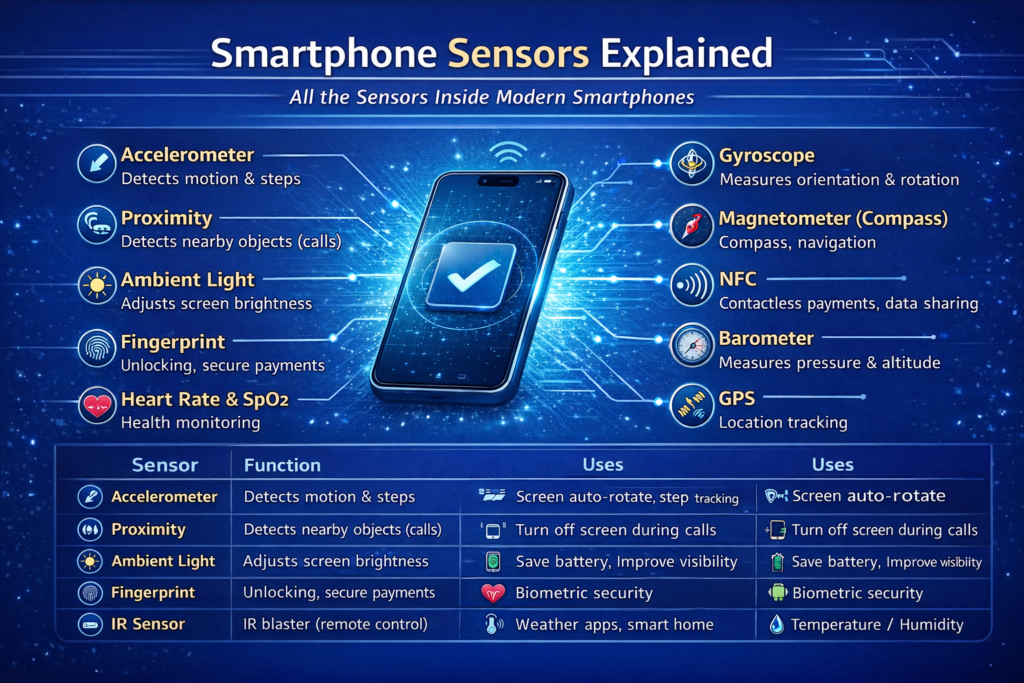
What Are Mobile Sensors?
A sensor is a hardware component that detects changes in the environment and sends the information to the smartphone’s processor.
Sensors allow your phone to:
- Detect motion
- Measure orientation
- Track location
- Sense light and proximity
- Enhance security features like face unlock
1. Accelerometer
Function: Measures linear acceleration and detects motion in three axes (X, Y, Z).
Uses:
- Screen rotation (portrait/landscape)
- Fitness tracking (steps, running distance)
- Gaming motion controls
- Shake gestures to perform actions
Example: When you shake your phone to undo typing or change songs.
2. Gyroscope
Function: Measures angular rotation and orientation. Works together with the accelerometer.
Uses:
- Advanced motion detection
- VR and AR apps
- Stabilizing images in camera apps
- Gaming controls
Example: When you move your phone in racing or shooting games for precise control.
3. Magnetometer (Digital Compass)
Function: Detects magnetic fields and orientation relative to Earth’s magnetic north.
Uses:
- Compass apps
- Navigation apps like Google Maps
- Augmented reality apps
Example: Google Maps uses the magnetometer to show the direction your phone is facing.
4. Proximity Sensor
Function: Detects objects near the phone without physical contact.
Uses:
- Turns off the screen during calls when near your ear
- Prevents accidental touches
Example: Screen turns off automatically when you hold the phone to your ear during a call.
5. Ambient Light Sensor
Function: Measures the light in the environment.
Uses:
- Adjusts screen brightness automatically
- Saves battery life
- Improves visibility in different lighting conditions
Example: Brightness increases outdoors in sunlight and dims at night.
6. Barometer
Function: Measures atmospheric pressure.
Uses:
- Improves GPS accuracy
- Weather forecasting
- Altitude detection for fitness tracking
Example: Helps fitness apps count floors climbed accurately.
7. Fingerprint Sensor
Function: Scans fingerprints for authentication.
Uses:
- Unlocking the phone
- Secure payments
- App authentication
Example: Found under-screen or on the back/power button in modern smartphones.
8. Heart Rate and SpO2 Sensors
Function: Measures heart rate and blood oxygen levels using light sensors.
Uses:
- Fitness tracking
- Health monitoring
- Smartwatch integration
Example: Samsung Galaxy Watch and Huawei phones use these sensors for health metrics.
9. Infrared (IR) Sensor
Function: Emits and detects infrared signals.
Uses:
- Remote control for TVs, ACs, and other appliances
- Face detection in some phones (infrared cameras)
Example: Phones with IR blasters can replace traditional remotes.
10. NFC Sensor (Near Field Communication)
Function: Enables short-range wireless communication.
Uses:
- Contactless payments (Apple Pay, Google Pay)
- Data sharing
- Pairing with devices
Example: Tap your phone on a POS machine to pay instantly.
11. GPS Sensor
Function: Receives signals from satellites to determine precise location.
Uses:
- Navigation apps
- Fitness tracking
- Location-based services
Example: Tracking delivery location or fitness route on apps like Strava.
12. Hall Sensor
Function: Detects magnetic fields.
Uses:
- Detects when a flip cover is closed
- Can help with smart cases
- Magnetic accessories detection
Example: Automatically locks screen when closing a phone cover.
13. Gyro + Accelerometer Combination (Motion Sensor)
Some smartphones combine sensors for advanced motion detection.
Uses:
- Stabilized photography & video
- AR/VR applications
- Gaming
Example: AR games like Pokémon Go or camera apps with advanced stabilization.
14. Temperature and Humidity Sensors
Function: Measures environmental temperature and humidity.
Uses:
- Weather apps
- Smart home integration
- Health apps (some experimental phones)
Example: Helps smart devices optimize indoor conditions.
15. Light Spectrum / Color Sensors
Function: Measures color temperature and light spectrum.
Uses:
- Camera optimization
- Accurate display color calibration
- AR applications
Example: Adjusts white balance for professional photography apps.
Summary: Sensor Uses in Smartphones
| Sensor | Main Use | Example |
|---|---|---|
| Accelerometer | Motion detection | Screen rotation, step counting |
| Gyroscope | Orientation & rotation | Gaming, VR |
| Magnetometer | Compass | Maps, navigation |
| Proximity | Detect nearby objects | Turn off screen during calls |
| Ambient Light | Auto-brightness | Save battery, adjust screen |
| Barometer | Pressure/altitude | GPS accuracy, floors climbed |
| Fingerprint | Authentication | Unlock phone, secure payments |
| Heart Rate & SpO2 | Health monitoring | Fitness apps |
| IR | Remote control | TV, AC |
| NFC | Contactless payments | Tap to pay |
| GPS | Location tracking | Navigation apps |
| Hall | Magnetic field detection | Smart covers |
| Temperature/Humidity | Environment | Weather apps, smart home |
Why These Sensors Matter
Sensors make smartphones smart, responsive, and interactive. Without them, features like fitness tracking, AR, VR, camera stabilization, contactless payments, and smart home integration wouldn’t exist.
Modern smartphones today have 8–15 sensors, and flagship devices continue to add more, making them closer to pocket-sized supercomputers.