When buying a laptop or upgrading your PC, one of the most important decisions is choosing the right storage type. You’ll usually see three options:
- HDD (Hard Disk Drive)
- SSD (Solid State Drive)
- SSHD (Solid State Hybrid Drive)
In this detailed guide, we’ll explain how each works, their pros and cons, performance differences, and which one you should choose in 2026.
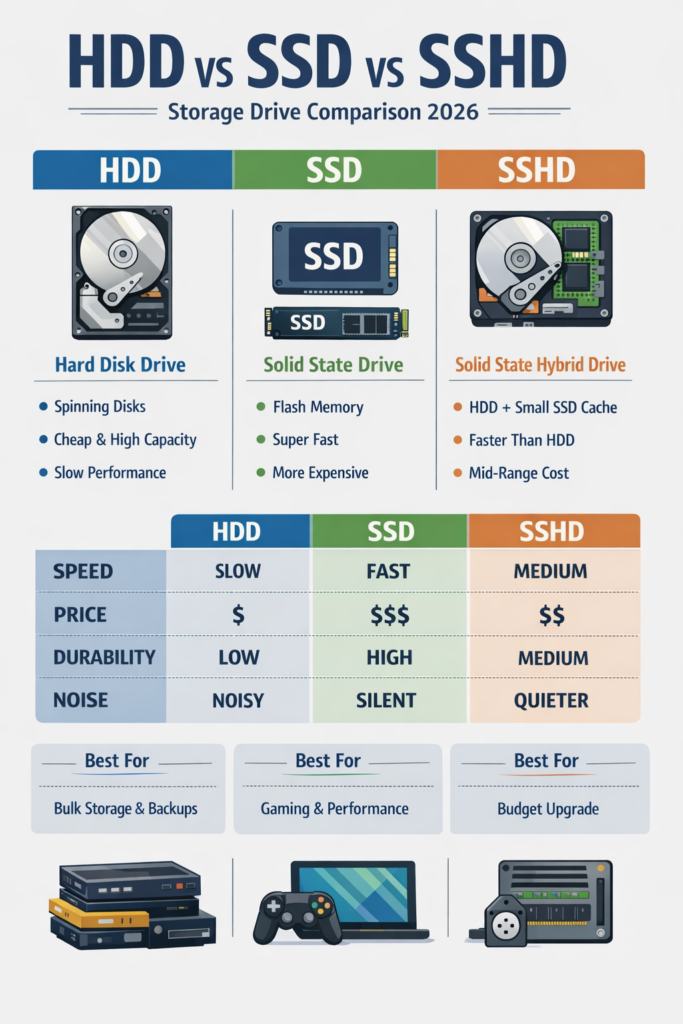
1) HDD (Hard Disk Drive) Explained
A Hard Disk Drive (HDD) is the traditional storage device used in computers for decades.
How HDD Works
An HDD contains:
- Spinning magnetic disks (platters)
- A mechanical arm that reads/writes data
- A motor that rotates the disk at high speed (usually 5400 RPM or 7200 RPM)
Data is stored magnetically on the spinning disk.
Advantages of HDD
- Cheapest storage per GB
- Available in very large capacities (1TB, 2TB, 4TB, 10TB+)
- Good for backups and bulk storage
Disadvantages of HDD
- Slow boot times
- Slow file transfers
- Mechanical parts can fail
- Noisy
- Higher power consumption
- Heavier
Ideal For:
- Storing movies, backups, and large files
- Budget desktop PCs
- CCTV storage systems
2) SSD (Solid State Drive) Explained
A Solid State Drive (SSD) is modern flash-based storage with no moving parts.
How SSD Works
SSD uses:
- NAND flash memory chips
- A controller
- No spinning disks
Because there are no mechanical parts, data is accessed instantly.
Types of SSD
1. SATA SSD
- Same interface as HDD
- Speeds up to ~550 MB/s
2. NVMe SSD
- Uses PCIe interface
- Speeds from 2000 MB/s to 7000+ MB/s
- Much faster than SATA
Advantages of SSD
- Extremely fast boot times
- Faster app loading
- Silent operation
- Lower power usage
- More durable
- Lightweight
Disadvantages of SSD
- More expensive than HDD
- Large capacities cost more
Ideal For:
- Gaming PCs
- Video editing
- Programming
- Office work
- Modern laptops
3) SSHD (Solid State Hybrid Drive) Explained
An SSHD (Solid State Hybrid Drive) combines HDD and SSD technology.
It was introduced by companies like Seagate to offer a balance between speed and storage.
How SSHD Works
- Contains a traditional HDD
- Includes a small built-in SSD (usually 8GB–32GB)
- Frequently used data is stored in the SSD portion
- Less-used data remains on HDD
It automatically learns your usage patterns.
Advantages of SSHD
- Faster than HDD
- Cheaper than full SSD
- Good compromise option
Disadvantages of SSHD
- Slower than real SSD
- Performance improvement is limited
- Not very popular in 2026
Ideal For:
- Older laptops
- Budget users wanting slight performance boost
Speed Comparison
| Feature | HDD | SSHD | SSD (SATA) | SSD (NVMe) |
|---|---|---|---|---|
| Boot Time | 30–60 sec | 15–30 sec | 10–15 sec | 5–10 sec |
| Speed | 80–160 MB/s | 100–200 MB/s | ~550 MB/s | 2000–7000+ MB/s |
| Noise | Yes | Yes | No | No |
| Durability | Low | Medium | High | High |
| Price | Cheapest | Medium | Expensive | Most Expensive |
Gaming Performance Difference
- HDD: Slow game loading, texture pop-in.
- SSHD: Slight improvement.
- SSD: Fast loading, smooth gameplay.
- NVMe SSD: Best performance, ideal for AAA titles.
Modern games optimized for SSD (especially after consoles like PlayStation 5 and Xbox Series X adopted SSDs) perform significantly better with SSD storage.
Price Per GB (2026 Approximation)
- HDD: Cheapest
- SSHD: Slightly more than HDD
- SATA SSD: Moderate
- NVMe SSD: Higher cost but worth it
SSD prices have dropped significantly, making them the default choice in most laptops today.
Power Consumption & Battery Life
For laptops:
- HDD drains battery faster.
- SSD improves battery life.
- NVMe SSD is efficient and best for ultrabooks.
Reliability & Lifespan
- HDD: Mechanical failure risk.
- SSHD: Still has mechanical parts.
- SSD: More durable, but has limited write cycles (which last many years for normal users).
In real-world use, SSDs are more reliable.
Which One Should You Buy in 2026?
Choose HDD If:
- You need massive storage (4TB+)
- You’re on a tight budget
- You need backup storage
Choose SATA SSD If:
- You want a budget speed upgrade
- You’re upgrading an old laptop
Choose NVMe SSD If:
- You’re building a gaming PC
- You do video editing
- You want maximum performance
Avoid SSHD in 2026 Unless:
- You find it very cheap
- Your device doesn’t support full SSD upgrade
Final Verdict
In 2026:
- SSD is the standard.
- NVMe SSD is the best choice for performance.
- HDD is still useful for storage.
- SSHD is mostly outdated.
For most users, the best setup is:
NVMe SSD for OS + HDD for storage
If you’re building or upgrading your PC, always prioritize SSD first — the performance difference is massive.