In the world of computer hardware, RAM (Random Access Memory) plays a crucial role in system performance. Among the various types, DDR (Double Data Rate) Synchronous Dynamic RAM has evolved through multiple generations: DDR (often called DDR1), DDR2, DDR3, DDR4, and now DDR5. This post focuses on DDR2, DDR3, and DDR4 — three generations that powered the majority of consumer and enterprise systems from roughly 2003 to the late 2010s/early 2020s.
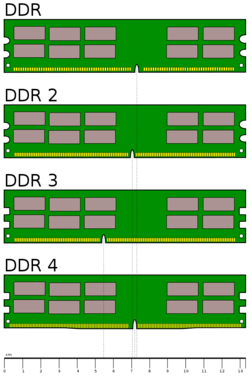
Each generation brought improvements in speed, power efficiency, capacity, and overall architecture. Understanding these differences helps explain why upgrading RAM (or choosing the right type for a build) matters — and why older systems can’t simply swap in newer modules.
A Quick Evolution Overview
- DDR2 (2003) — Improved speed and power over original DDR.
- DDR3 (2007) — Doubled prefetch, lower voltage, higher capacities.
- DDR4 (2014) — Even lower voltage, higher frequencies, better reliability features.
Note: These generations are not backward or forward compatible due to different pin counts, notch positions, and electrical requirements.
Core Technical Differences
The main advancements come from:
- Voltage — Lower voltage = less power consumption and heat.
- Data Rate / Speed (measured in MT/s — mega transfers per second).
- Prefetch Buffer — How much data the memory grabs in advance per cycle.
- Bandwidth — Real-world data throughput per channel.
- Physical Design — Pin count and notch location prevent mismatches.
- Latency & Efficiency — Trade-offs between speed and access time.
Here’s a side-by-side comparison of typical specifications:
| Feature | DDR2 | DDR3 | DDR4 |
|---|---|---|---|
| Release Year | 2003 | 2007 | 2014 |
| Voltage (standard) | 1.8 V | 1.5 V (1.35 V low-power variants) | 1.2 V (1.05–1.1 V low-power) |
| Pin Count (DIMM) | 240 pins | 240 pins | 288 pins |
| Notch Position | Center (different from DDR) | Slightly left of center | Far right of center |
| Prefetch Buffer | 4n | 8n | 8n |
| Common Speeds (MT/s) | 533, 667, 800 | 1066, 1333, 1600, 1866, 2133 | 2133, 2400, 2666, 3200 (up to 4800+ OC) |
| Peak Bandwidth (single channel, GB/s) | ~4.3–6.4 | ~8.5–17.0 | ~17.0–25.6 (higher with OC) |
| Max Typical Capacity per Stick | 4 GB (rare 8 GB) | 16 GB (some 32 GB server) | 32 GB (64 GB+ common now) |
| CAS Latency (typical) | Higher relative to speed | Moderate | Slightly higher numbers but better real performance |
| Power Efficiency | Moderate | Good (≈30–40% better than DDR2) | Excellent (≈20–30% better than DDR3) |
How Each Generation Improved Performance
1. Voltage and Power Consumption
Lower operating voltage is one of the biggest leaps:
- DDR2 at 1.8 V was already better than original DDR (2.5 V).
- DDR3 dropped to 1.5 V → roughly 30–40% less power than DDR2.
- DDR4 at 1.2 V → another ~20–30% reduction compared to DDR3.
This matters hugely for laptops, servers, and energy-conscious builds.
2. Speed and Bandwidth
Bandwidth roughly doubles with each generation (at stock speeds):
- DDR2-800 → ~6.4 GB/s per channel
- DDR3-1600 → ~12.8 GB/s
- DDR4-3200 → ~25.6 GB/s
DDR4 modules commonly run at 3200–3600 MT/s in consumer systems, while high-end kits push 4000+ MT/s.
3. Prefetch and Architecture
- DDR2 introduced 4-bit prefetch (grabs 4 bits per cycle).
- DDR3 and DDR4 both use 8-bit prefetch → better efficiency at high frequencies.
DDR4 also added per-DIMM voltage regulation (better stability at high speeds) and improved command/address bus reliability.
4. Capacity and Density
- DDR2 topped out at ~4 GB per stick for consumer use.
- DDR3 reached 8–16 GB commonly, 32 GB in servers.
- DDR4 easily supports 16–64 GB per stick in consumer modules (128 GB+ in servers).
5. Latency Reality Check
Higher MT/s often comes with higher CAS latency numbers:
- DDR3-1600 CL11 ≈ real latency ~13.75 ns
- DDR4-3200 CL16 ≈ real latency ~10 ns
Despite higher CL numbers on DDR4, actual access time is often better due to architectural improvements.
Physical Compatibility (Why You Can’t Mix Them)
All three use 240-pin or 288-pin DIMMs, but:
- DDR2 and DDR3 both have 240 pins → but different key notch locations → won’t fit.
- DDR4 has 288 pins + completely different notch position.
SO-DIMMs (laptops) follow similar incompatibility rules.
Real-World Performance Impact (2000s–2020s Perspective)
- DDR2 era (2003–2008): Huge jump from DDR1; enabled smoother multitasking in Windows XP/Vista.
- DDR3 era (2007–2015): Dominated for a decade; excellent longevity; still viable in budget builds until ~2020.
- DDR4 era (2014–2022+): Standard for gaming, content creation, productivity until DDR5 platforms matured.
In 2026, DDR4 remains very capable for most users, especially at 3200–3600 MT/s. DDR5 offers 15–25% average gains in modern workloads (especially gaming on newer CPUs), but the platform cost is higher.
Which One Should You Use in 2026?
- DDR2 — Only for very old legacy systems (pre-2008); parts are scarce and expensive.
- DDR3 — Still found in budget office machines and some 2nd/3rd-gen Intel/AMD builds; cheap but limited.
- DDR4 — Best value/performance sweet spot right now for most upgrades and new budget/mid-range builds.
- DDR5 — Future-proof choice if building a new high-end system (AMD Ryzen 7000/9000, Intel 12th gen+).
Conclusion
The progression from DDR2 → DDR3 → DDR4 is a story of steady engineering refinement: lower power, higher bandwidth, greater density, and better reliability — all while keeping the core DDR concept of transferring data on both rising and falling clock edges.
Each jump roughly doubled effective performance while cutting power use significantly. Even today, understanding these differences helps when shopping for used hardware, upgrading older PCs, or deciding whether DDR5 is worth the premium.
If you’re building or upgrading a system in 2026, DDR4 still delivers excellent value for most people, while DDR5 is the clear choice for maximum future-proofing.
Have you upgraded from DDR3 or DDR4 recently? What differences did you notice? Let me know in the comments!