Every time you connect to the internet — whether you are checking email, streaming a movie, making a video call, or simply browsing the web — your device is participating in a constant, invisible exchange of data with thousands of servers, networks, and systems around the world. Most of that traffic is legitimate. Some of it is not.
Lurking in the shadows of every network connection are automated bots probing for vulnerabilities, cybercriminals scanning for open ports, malware attempting to “call home” to its command-and-control server, and countless other threats that most users never see and rarely think about. The reason most of us never experience these threats directly is partly luck — and largely because of firewalls.
A firewall is one of the oldest, most fundamental, and most misunderstood concepts in cybersecurity. It is simultaneously praised as an essential line of defense and criticized for creating false confidence, blocking legitimate traffic, and slowing networks. Is a firewall good or bad? The answer, as with most things in security, is nuanced.
This guide explains what a firewall is, how the different types work, what they protect against, where they fall short, and how to think about them intelligently in the modern threat landscape.
What Is a Firewall?
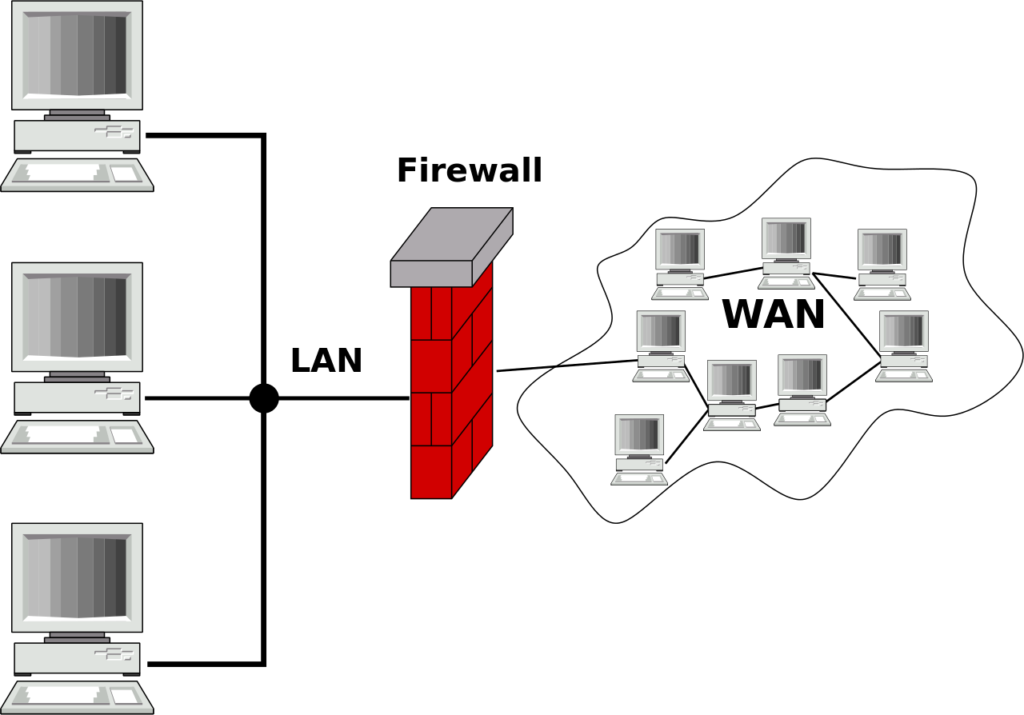
A firewall is a network security system — hardware, software, or a combination of both — that monitors and controls incoming and outgoing network traffic based on a predetermined set of security rules. It establishes a barrier between a trusted internal network (your home network, your company’s corporate network) and untrusted external networks (the internet, a third-party network).
The term comes from construction and firefighting: a firewall is a physical barrier designed to prevent fire from spreading from one area to another. In networking, the concept is analogous — the firewall is a barrier designed to prevent unauthorized or malicious traffic from spreading into your network.
At its most basic level, a firewall does one of three things with any piece of network traffic: it allows it through, it blocks it, or it logs it for later analysis. The rules that govern these decisions are configured by network administrators — or by default policies set by the firewall vendor — and they can be as simple as “block all incoming connections on port 23” or as sophisticated as “allow traffic from this specific IP range only if it matches this application signature and the user has authenticated via multi-factor authentication in the past 8 hours.”
Firewalls can be deployed at multiple points in a network architecture: at the perimeter (between the internet and the internal network), at the host level (running on individual computers), between network segments internally, and in the cloud protecting cloud workloads. In modern enterprise environments, multiple firewalls of different types operate simultaneously, forming layered defenses.
A Brief History of Firewalls
Understanding where firewalls came from helps explain why they work the way they do.
First Generation: Packet Filtering (Late 1980s)
The first firewalls emerged in the late 1980s in response to the growing connectivity of the internet and early high-profile network attacks, including the Morris Worm of 1988 — one of the first recognized internet worms, which infected thousands of Unix machines and caused millions of dollars in damage.
Digital Equipment Corporation (DEC) engineer Jeff Mogul is widely credited with developing the first packet filter firewall around 1988. These early firewalls operated at the network layer and made simple decisions based on the header information of individual network packets: source IP address, destination IP address, source port, destination port, and protocol (TCP, UDP, ICMP). No context, no connection state, no deep inspection — just rule-matching on packet headers.
Second Generation: Stateful Inspection (Early 1990s)
The critical limitation of packet filtering was that it examined each packet in isolation without understanding whether it was part of an ongoing legitimate connection. Attackers could craft packets that technically matched allow rules but were actually attack traffic.
Stateful inspection, developed by Check Point Software’s Nir Zuk and introduced in the FireWall-1 product in 1993–1994, solved this by tracking the state of network connections. A stateful firewall maintains a connection table — a record of all active network sessions — and makes decisions not just on individual packet headers but on whether a given packet is a legitimate part of an established, known connection. This was a major leap in security capability.
Third Generation: Application Layer Firewalls and Proxies (Mid-1990s)
As the web grew and attackers began exploiting vulnerabilities at the application layer (above the network and transport layers), pure stateful inspection was insufficient. Application-layer firewalls and proxy firewalls could inspect the actual content of traffic — reading HTTP headers, FTP commands, SMTP email content — and make intelligent decisions based on application-layer behavior.
Fourth Generation: Next-Generation Firewalls (2000s–Present)
The modern era brought Next-Generation Firewalls (NGFWs), which combine traditional firewall functions with deep packet inspection, intrusion prevention systems (IPS), SSL/TLS decryption and inspection, application awareness and control, user identity integration, and threat intelligence feeds. Vendors like Palo Alto Networks, Fortinet, Cisco, and Check Point lead the NGFW market today.
More recently, firewalls have evolved further into cloud-native firewalls, Firewall-as-a-Service (FWaaS) platforms, and components within broader Secure Access Service Edge (SASE) architectures that extend firewall protection to remote users, cloud environments, and distributed workforces.
How Firewalls Work: The Technical Mechanics
Network Layers and the OSI Model
To understand different firewall types, you need a basic understanding of the OSI (Open Systems Interconnection) model — the conceptual framework that describes how network communication is organized into seven layers:
Layer 1 — Physical (cables, wireless signals) Layer 2 — Data Link (MAC addresses, switches) Layer 3 — Network (IP addresses, routing) Layer 4 — Transport (TCP/UDP ports, connection state) Layer 5 — Session (session establishment and management) Layer 6 — Presentation (encryption, encoding) Layer 7 — Application (HTTP, DNS, SMTP, FTP — what the user actually does)
Different firewall types operate at different layers of this model, and the layer at which a firewall operates determines what it can and cannot see — and therefore what it can and cannot protect against.
Packet Filtering Firewalls
Packet filtering firewalls operate at Layers 3 and 4. They examine each packet’s header — source and destination IP addresses, source and destination ports, and protocol — and compare this information against a set of rules (an Access Control List, or ACL). If a packet matches an allow rule, it passes. If it matches a deny rule, it is dropped. If it matches nothing, it is either dropped (default deny) or allowed (default allow), depending on the firewall’s default policy.
Example rule: ALLOW TCP traffic from any source IP to destination port 443 (HTTPS) on the web server. DENY all other inbound traffic.
Packet filtering is fast and lightweight but provides limited protection. It cannot inspect the content of traffic, cannot detect sophisticated attacks that use allowed ports and protocols, and has no understanding of connection state.
Stateful Inspection Firewalls
Stateful inspection firewalls operate at Layers 3, 4, and partially 5. They maintain a state table (also called a connection tracking table) that records information about all active network connections: source IP, destination IP, source port, destination port, protocol, and connection state (SYN sent, established, closing, etc. in TCP terminology).
When a new packet arrives, the firewall first checks whether it belongs to an existing tracked connection. If it does, and the packet is consistent with the expected state of that connection, it is allowed without re-evaluating the full rule set. If it is a new connection attempt, the rules are evaluated. If it appears to be a response packet but there is no matching connection in the state table, it is dropped — this prevents certain spoofed-packet attacks.
Stateful inspection is the baseline for virtually all modern firewalls. The state table approach is efficient and provides meaningful protection against many attack types, but it still cannot inspect the content of encrypted or application-layer traffic.
Application Layer Firewalls (Proxy Firewalls)
Application layer firewalls operate at Layer 7. Rather than simply routing packets, they act as a proxy — a middleman between the client and the server. The client connects to the firewall, not directly to the server. The firewall inspects the application-layer content of the request, validates it against policy, and (if allowed) makes a separate connection to the actual server on the client’s behalf.
This means the firewall can read and understand the specific application protocol being used: it can inspect HTTP requests and look for malicious URLs, check FTP commands for unauthorized operations, scan SMTP email for malware attachments, or block specific SQL commands in database traffic. The application layer firewall can enforce policy at a much finer granularity than a packet filter or stateful firewall.
The trade-offs are performance (processing full application-layer content is significantly more resource-intensive than header inspection) and potential compatibility issues (some applications behave unexpectedly when proxied).
Deep Packet Inspection (DPI)
Deep Packet Inspection is a technique used by Next-Generation Firewalls that examines the payload (the actual content) of network packets, not just the header. DPI can identify applications by their traffic signatures even if they use non-standard ports, detect malware signatures within traffic, identify protocol violations and anomalies, and enable granular application-level controls.
DPI is powerful but computationally intensive and raises privacy considerations — inspecting the content of user traffic means the firewall (and by extension, the organization operating it) has access to that content. For encrypted traffic (HTTPS, TLS), DPI requires an additional step called SSL/TLS inspection, where the firewall decrypts, inspects, and re-encrypts traffic — a technique that is effective but adds latency and introduces its own security and privacy implications.
Next-Generation Firewalls (NGFWs)
An NGFW combines all of the above — stateful inspection, DPI, application awareness — with additional capabilities that make it a comprehensive security platform:
Intrusion Prevention System (IPS) — actively identifies and blocks known attack patterns, exploit attempts, and malicious traffic signatures in real time, not just after the fact.
Application Identification and Control — recognizes specific applications (Facebook, Dropbox, Zoom, BitTorrent) regardless of port or protocol, enabling granular control. “Block BitTorrent but allow Zoom” is enforceable at the network layer.
User Identity Integration — maps network traffic to specific users (via Active Directory integration or captive portal authentication) rather than just IP addresses, enabling user-based policies: “Allow the Finance team to access the accounting server; deny everyone else.”
Threat Intelligence Feeds — continuously updated databases of known malicious IP addresses, domains, URLs, and file hashes, enabling the firewall to block traffic to and from known bad actors.
URL Filtering — categorizes websites by content type and allows organizations to block categories (gambling, adult content, social media during work hours) or specific URLs.
SSL/TLS Inspection — decrypts and inspects encrypted traffic for threats, addressing the “encryption blindspot” of traditional firewalls.
Sandboxing — sends suspicious files to a cloud-based sandbox environment where they can be safely executed and observed for malicious behavior before being allowed into the network.
Types of Firewalls by Deployment
Beyond the technical classification above, firewalls are also categorized by where and how they are deployed.
Hardware Firewalls
A hardware firewall is a dedicated physical appliance — a specialized device sitting at the network perimeter, typically between your router and your internal network. Enterprise hardware firewalls from Palo Alto Networks, Fortinet (FortiGate), Cisco (Firepower, ASA), and Check Point can process enormous volumes of traffic at wire speed, supporting the needs of large corporate networks.
For home networks, the router provided by your ISP or a consumer router with built-in firewall functionality (like those from ASUS, Netgear, or TP-Link) typically includes a basic hardware/firmware firewall. It provides essential protection but lacks the sophistication of enterprise appliances.
Advantages: High performance, dedicated processing, difficult to disable or bypass, protects all devices on the network regardless of their individual software state.
Disadvantages: Higher upfront cost, requires physical installation and maintenance, limited to protecting traffic at the point of deployment (cannot protect devices when they roam outside the network).
Software Firewalls (Host-Based Firewalls)
A software firewall runs as an application on an individual device — a laptop, desktop, or server. Windows Defender Firewall (built into Windows), macOS’s Application Firewall, and Linux’s iptables/nftables are examples of built-in software firewalls. Third-party products like ZoneAlarm or Little Snitch offer more granular control.
Host-based firewalls protect the individual device regardless of where it connects — at home, in a coffee shop, or on a corporate network — making them essential for laptops and remote workers.
Advantages: Protects the device wherever it goes, can be configured per-application (this app can connect to the internet; this one cannot), no additional hardware required.
Disadvantages: Only protects the host it runs on (not other devices on the same network), can potentially be disabled by malware running on the same system, adds some computational overhead to the host.
Cloud Firewalls (Firewall-as-a-Service)
As workloads have migrated to the cloud and employees have dispersed geographically, traditional perimeter firewalls have become insufficient. Cloud firewalls — either native firewall services offered by cloud platforms (AWS Security Groups and Network ACLs, Azure Firewall, Google Cloud Firewall) or third-party FWaaS solutions (Zscaler, Cloudflare Gateway, Palo Alto Prisma Access) — extend firewall protection to cloud resources and remote users.
Cloud-native firewalls are configured through APIs and management consoles rather than physical appliances, scale elastically with workload demands, and can be deployed globally with minimal latency for geographically distributed organizations.
Virtual Firewalls
Virtual firewalls are software-defined firewall instances that run within virtualized or cloud environments, protecting traffic between virtual machines, containers, or cloud instances — traffic that never leaves the data center and would be invisible to a physical perimeter firewall. They are essential components of modern cloud and data center security architectures.
What Firewalls Protect Against
Firewalls are effective defenses against a specific set of threats:
Unauthorized access attempts — port scans, brute force login attempts against exposed services, and exploitation attempts against known vulnerabilities in services exposed to the internet. A properly configured firewall that only exposes necessary services dramatically reduces the attack surface.
Denial of Service (DoS) attacks — firewalls can detect and throttle or block traffic patterns consistent with DoS attacks, protecting internal resources from being overwhelmed.
Network-based malware propagation — worms and other self-propagating malware spread by scanning for vulnerable systems across networks. A firewall blocking unnecessary lateral communication between internal segments can contain an infection and prevent it from spreading.
Data exfiltration — outbound firewall rules can prevent malware from sending stolen data to external command-and-control servers, or prevent unauthorized applications from communicating with the internet.
Unauthorized services — firewalls ensure that only explicitly permitted network services are accessible, preventing shadow IT scenarios where employees run unauthorized servers or services that create unintended exposure.
Malicious content categories — NGFWs with URL filtering and threat intelligence block access to known malware distribution sites, phishing pages, botnet command-and-control domains, and other malicious categories.
What Firewalls Do NOT Protect Against
This is where the “bad” argument about firewalls comes in — not that firewalls are bad, but that over-reliance on them creates dangerous blind spots. A firewall is not a comprehensive security solution. It has meaningful, well-documented limitations:
Threats That Come from Inside
Traditional perimeter firewalls assume a clear inside/outside divide: the inside is trusted, the outside is untrusted. But a significant proportion of security incidents involve insider threats — malicious or negligent employees, contractors with legitimate network access, or attackers who have already compromised internal systems.
Once an attacker is inside the perimeter, a perimeter firewall provides no protection against their lateral movement through the internal network. This is why the security industry has moved toward Zero Trust Architecture — treating every connection as potentially untrusted regardless of where it originates, and requiring authentication and authorization at every step.
Encrypted Traffic (Without Inspection)
As of 2024, the vast majority of internet traffic is encrypted via HTTPS/TLS. A traditional firewall without SSL/TLS inspection capability is essentially blind to the content of most modern web traffic. It can see that a connection was made to a particular IP address, but not what was in that connection. Malware delivered over HTTPS, data exfiltrated over encrypted channels, and phishing content served from HTTPS sites are invisible to inspection-less firewalls.
SSL/TLS inspection addresses this — but introduces its own complexity, performance overhead, and privacy considerations (the firewall effectively performs a man-in-the-middle decryption of all encrypted traffic).
Application-Layer Vulnerabilities
A firewall that allows HTTP/HTTPS traffic to a web server (as virtually every web server firewall must) cannot prevent attacks against vulnerabilities in the web application itself — SQL injection, cross-site scripting (XSS), cross-site request forgery (CSRF), authentication bypass, and other OWASP Top 10 vulnerabilities. These are application-layer problems that require application-layer solutions (Web Application Firewalls, secure coding practices, security testing) rather than network-layer firewalls.
Social Engineering and Phishing
Firewalls do not protect against a user clicking a malicious email link, downloading a trojanized file from a legitimate file-sharing service, entering credentials on a convincing phishing page, or being manipulated into taking harmful actions by a social engineer. The human element of security is largely beyond the firewall’s scope, though some NGFWs with URL filtering can block known phishing domains.
Zero-Day Attacks
Signature-based detection — whether in a firewall, IPS, or antivirus — requires knowing what an attack looks like before it can be detected. Zero-day attacks exploit vulnerabilities that have not yet been discovered and patched, for which no signatures exist. Behavioral detection and sandboxing in NGFWs help, but no security control provides complete protection against truly novel attack techniques.
Misconfiguration
A firewall is only as good as its configuration. Misconfigured firewalls — with overly permissive rules, unchanged default credentials, unnecessary services enabled, or stale rules that were never removed — provide false confidence while offering little real protection. Security audits consistently find firewalls with “allow any any” rules (permitting all traffic regardless of source or destination), administrative interfaces exposed to the internet, and rule sets that haven’t been reviewed in years.
Is a Firewall Good or Bad? An Honest Assessment
The Case for Firewalls Being Good
Firewalls are unambiguously beneficial when properly designed, configured, and maintained as part of a layered security strategy. The evidence is overwhelming:
They reduce attack surface dramatically. Every internet-connected device and network faces constant automated scanning from bots searching for vulnerable services. A firewall that closes all unnecessary ports eliminates those services as attack vectors entirely. The vast majority of automated attacks are prevented by basic firewall rules that block access to ports and services that have no business being exposed.
They enforce least privilege at the network level. Network segmentation enforced by firewalls limits the blast radius of a security incident. If an attacker compromises one system in a segmented network, firewall rules between segments slow or prevent lateral movement to other systems.
They provide visibility. Even the simplest firewall generates logs that reveal what traffic is traversing the network — essential for incident detection, forensic investigation, and compliance reporting.
They are a mature, proven technology. Decades of real-world deployment have refined firewall technology and our understanding of how to deploy it effectively. The security community has extensive documented knowledge of best practices.
They are a compliance requirement. Nearly every major security compliance framework — PCI-DSS, HIPAA, SOC 2, ISO 27001, NIST — requires firewall controls. For regulated industries, firewalls are not optional.
The Case Against Over-Relying on Firewalls
The criticisms of firewalls are not arguments that firewalls are bad — they are arguments against treating firewalls as a sufficient or complete security solution:
The “hard shell, soft interior” problem. Traditional perimeter-focused firewall strategies create a hard outer shell with a soft, trusting interior. If an attacker breaches the perimeter — via phishing, a compromised credential, a vulnerability in a perimeter-exposed service — they often find the internal network largely undefended. This was dramatically illustrated by major breaches like Target (2013), where attackers entered through a third-party HVAC vendor’s remote access connection that bypassed the perimeter firewall entirely.
False confidence is dangerous. Organizations that over-invest in perimeter firewalls and under-invest in other controls — endpoint security, identity management, application security, security awareness training, incident detection and response — are left with a false sense of security. A spectacular perimeter firewall does not help if an attacker delivers malware via a spear-phishing email.
Modern network architecture has eroded the traditional perimeter. The perimeter firewall model assumes a clear network boundary: inside is yours, outside is not. But cloud computing, remote work, mobile devices, and SaaS applications have dissolved that boundary. An employee working from home is “outside” the corporate firewall. A workload in AWS is “outside” the corporate firewall. The perimeter is everywhere and nowhere simultaneously.
Blocking legitimate traffic creates real costs. Overly aggressive firewall rules create friction for legitimate users and business processes — blocked web applications, VPN connectivity issues, video conferencing problems, failed software updates. Each false positive has a business cost: lost productivity, IT support burden, and sometimes employees deliberately circumventing firewall controls (using personal hotspots, unauthorized cloud storage) to get their work done, creating shadow IT risks.
Firewalls cannot fix bad software. A web application with SQL injection vulnerabilities is vulnerable whether or not a perimeter firewall exists. Application security requires secure development practices, code review, and testing — not just network controls.
The Modern Approach: Firewalls as One Layer of Defense-in-Depth
The mature, sophisticated view of firewalls is that they are a necessary but not sufficient component of a comprehensive security architecture. The industry term for this approach is defense-in-depth — multiple overlapping layers of security controls, so that the failure of any single control does not result in a catastrophic breach.
In a modern defense-in-depth architecture, firewalls play a critical but bounded role alongside:
Zero Trust Network Access (ZTNA) — verifying every user and device, authenticating every access request regardless of network location, and enforcing least-privilege access to specific applications rather than broad network access.
Endpoint Detection and Response (EDR) — security agents on individual devices that detect and respond to threats at the endpoint level, providing protection that firewalls cannot.
Identity and Access Management (IAM) — strong authentication (MFA), privileged access management, and identity governance to prevent credential-based attacks.
Security Information and Event Management (SIEM) — centralized log aggregation, correlation, and alerting to detect threats that evade preventive controls.
Web Application Firewalls (WAF) — specialized firewalls that protect web applications against application-layer attacks (SQLi, XSS) that network firewalls cannot detect.
Security Awareness Training — educating users to recognize phishing, social engineering, and other human-targeted attacks that technology controls cannot fully prevent.
Vulnerability Management — regularly scanning for and patching vulnerabilities before attackers can exploit them, reducing the attack surface that firewalls defend.
In this context, the firewall remains vital — it provides the baseline network access control, reduces automated attack exposure, enables segmentation, and generates essential visibility. But it is one player in a team, not a solo defender.
Firewalls for Home Users: Practical Guidance
For individual home users, the firewall landscape is simpler but still important:
Your router’s built-in firewall is your first line of defense. Modern consumer routers include stateful packet inspection and Network Address Translation (NAT), which effectively hides your internal devices from direct internet exposure. Ensure your router’s firewall is enabled (it usually is by default), that the admin password has been changed from the default, that the firmware is kept up to date, and that remote administration is disabled.
Your operating system’s software firewall provides host-level protection. Windows Defender Firewall is on by default in Windows and provides meaningful protection; do not disable it. macOS’s firewall should be enabled in System Settings > Network > Firewall.
For advanced home users, a dedicated security router or a small firewall appliance (such as those running pfSense, OPNsense, or UniFi Security Gateway firmware) provides significantly more capability — VLAN segmentation, IPS, more granular rules, and detailed logging.
What home users should NOT do: rely solely on the firewall and skip other controls (antivirus/EDR, browser security, phishing-aware email practices, strong unique passwords with a password manager, and regular software updates). The firewall is the barrier at the door; you still need to secure what is inside.
Conclusion: Necessary, Not Magical
A firewall is a network security control that monitors and filters traffic based on rules, protecting networks and devices from unauthorized access, attack traffic, and malicious content. It comes in multiple forms — packet filters, stateful inspection engines, application proxies, Next-Generation Firewalls, cloud firewalls — each operating at a different layer of the network stack and offering different capabilities and trade-offs.
Is a firewall good? Yes — unambiguously. A properly configured firewall reduces attack surface, enforces network segmentation, generates visibility, and provides defense against a wide range of automated and targeted attacks. No serious security practitioner would recommend operating a network without one.
Is a firewall bad? Not intrinsically — but it becomes bad when it becomes a crutch. When organizations treat firewall deployment as a checkbox that means “we are secure,” when they fail to configure and maintain it properly, when they build security strategies that ignore the many threat categories that firewalls cannot address — that is when firewalls become dangerous. Not because they cause harm, but because they enable complacency that harms.
The firewall is a castle wall. It is an important and necessary part of the castle’s defenses. But a castle also needs guards, locked gates, watchmen on the towers, secure chambers inside, and a plan for what to do when the wall is eventually breached. The firewall does not secure the castle. It contributes to securing it — and that contribution is both real and meaningful, as long as we understand exactly what it is and what it is not.