Is your phone’s battery acting weird?
- 🔋 Drops from 40% to 10% suddenly
- 📱 Shuts down at 15%
- ⚡ Charges very fast from 0–20%
- 🔌 Stuck at 100% for long time
Don’t worry — in many cases, the problem is not the battery itself. It’s the battery calibration.
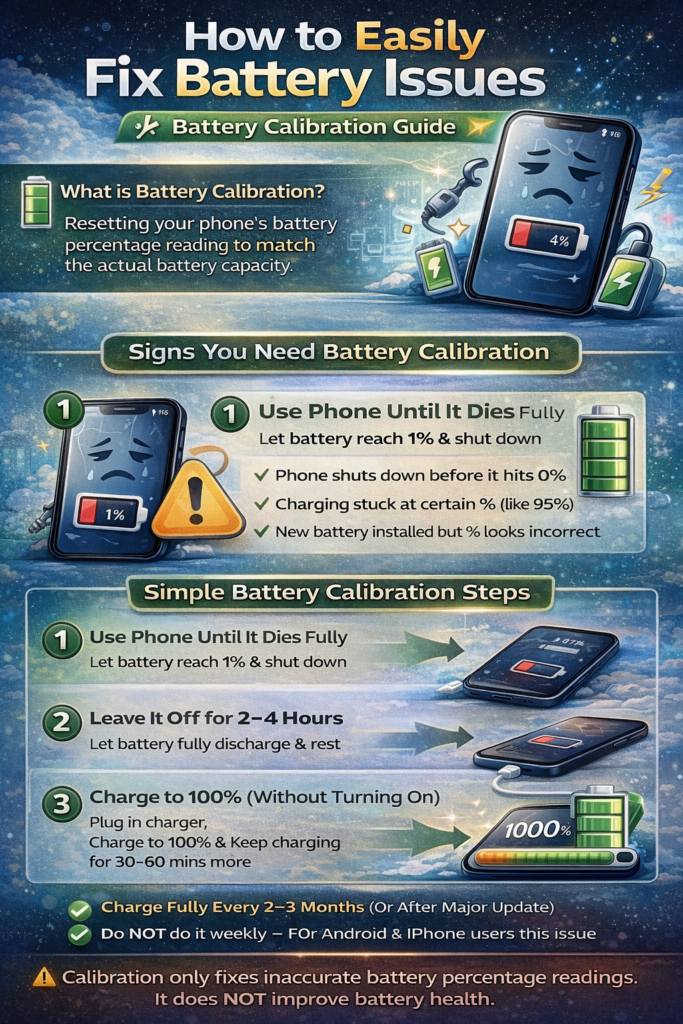
In this guide, I’ll explain what battery calibration is, when you need it, and how to safely do it on both Android and iPhone.
What is Battery Calibration?
Battery calibration means:
Resetting your phone’s battery percentage reading so it matches the real battery capacity.
Your phone uses software to estimate battery percentage. Over time, this estimate becomes inaccurate.
Calibration helps the system:
- Relearn true 0% and 100% levels
- Fix incorrect battery percentage jumps
- Improve battery indicator accuracy
⚠ Important: Calibration does NOT increase battery health. It only fixes inaccurate percentage readings.
Why Battery Percentage Becomes Wrong
1) Software Updates
After major updates (like Android version upgrade or iOS update), battery stats may become inaccurate.
2) Frequent Partial Charging
If you always charge between 30–80%, system may forget true full capacity.
3) Background Apps & Cache
Battery stats files may get corrupted over time.
4) Battery Aging
After 2–3 years, lithium batteries degrade naturally.
Phones from:
- Apple
- Samsung
- Xiaomi
can all experience this issue.
Signs You Need Battery Calibration
✔ Phone shuts down before 0%
✔ Battery jumps randomly
✔ Charging stuck at certain %
✔ New battery installed but % looks incorrect
If your battery drains very fast even after calibration → it may be a hardware issue.
How to Calibrate Battery (Android & iPhone)
This method works for most smartphones.
Step-by-Step Battery Calibration Method
Step 1: Use Phone Until It Dies Completely
Use your phone normally until:
- Battery reaches 1%
- Phone shuts down automatically
⚠ Don’t force shutdown — let it turn off naturally.
Step 2: Leave It Off for 2–4 Hours
Let the battery rest fully discharged.
This helps stabilize voltage.
Step 3: Charge to 100% (Without Turning It On)
Plug in original charger.
Important:
- Do NOT turn on the phone while charging
- Charge until it reaches 100%
- Keep charging for extra 30–60 minutes
Step 4: Turn It On & Use Normally
After full charge:
- Turn phone on
- Use normally
- Avoid heavy gaming for first few hours
Your battery percentage should now be more accurate.
For iPhone Users (Extra Tip)
On iPhones, you can check battery health:
Settings → Battery → Battery Health
If Maximum Capacity is below 80%, calibration won’t help much — you may need battery replacement.
(Feature available on modern iPhones from Apple.)
For Android Users (Advanced Tip)
Some older Android phones allowed deleting:batterystats.bin
But in modern Android versions:
- This file resets automatically
- Manual deletion is not required
Avoid installing fake “battery calibration apps” — they usually do nothing useful.
How Often Should You Calibrate?
Only once every 2–3 months
Or after major software update
Or after battery replacement
Do NOT do it weekly — deep discharge stresses lithium batteries.
When Calibration Will NOT Fix the Problem
Calibration will NOT help if:
❌ Battery is physically swollen
❌ Phone heats excessively
❌ Battery drains 50% in 1 hour
❌ Battery health below 75%
In that case, battery replacement is the only solution.
Bonus: Tips to Improve Battery Life
Since you run a tech blog and likely test many apps, here are some practical tips you can also share with readers:
✔ Keep battery between 20–80% for daily use
✔ Avoid overnight charging daily
✔ Use original charger
✔ Avoid extreme heat
✔ Disable unnecessary background apps
✔ Keep 20% storage free
Common Myths About Battery Calibration
Myth 1: Draining to 0% improves battery health
Not true. Lithium batteries prefer partial cycles.
Myth 2: Charging to 100% always damages battery
Occasional 100% charging is fine.
Myth 3: Calibration increases battery capacity
No. It only fixes the percentage reading.
Final Verdict
If your phone battery percentage behaves strangely:
👉 Try calibration first.
👉 It’s free and safe when done correctly.
But if battery health is low, calibration won’t perform miracles.
Simple One-Line Summary
Battery calibration resets your phone’s battery percentage reading to make it accurate again — but it does NOT increase battery health.