Whether you want to keep your personal chats separate from work, manage two SIMs, or simply use one number for friends and another for business, running two WhatsApp accounts on a single phone is now super easy and official. No more shady third-party apps, clones, or constant logouts!
As of March 2026, WhatsApp fully supports multi-account (up to two accounts) natively in the same app on both Android and iOS. This feature rolled out progressively since 2023 (Android) and late 2025 (iOS), and it’s stable for most users worldwide, including in Pakistan.
Here’s everything you need to know — step-by-step setup, switching, tips, and alternatives if you’re on an older version.
Why Use Two WhatsApp Accounts?
- Separate personal and professional life
- Use dual-SIM phones properly (common in Pakistan with Jazz/Zong + another)
- Keep family chats away from client/work messages
- Customize notifications, privacy, profile pics, and about sections per account
Requirement: You need two different phone numbers (each verified via SMS/call). One number = one WhatsApp account.
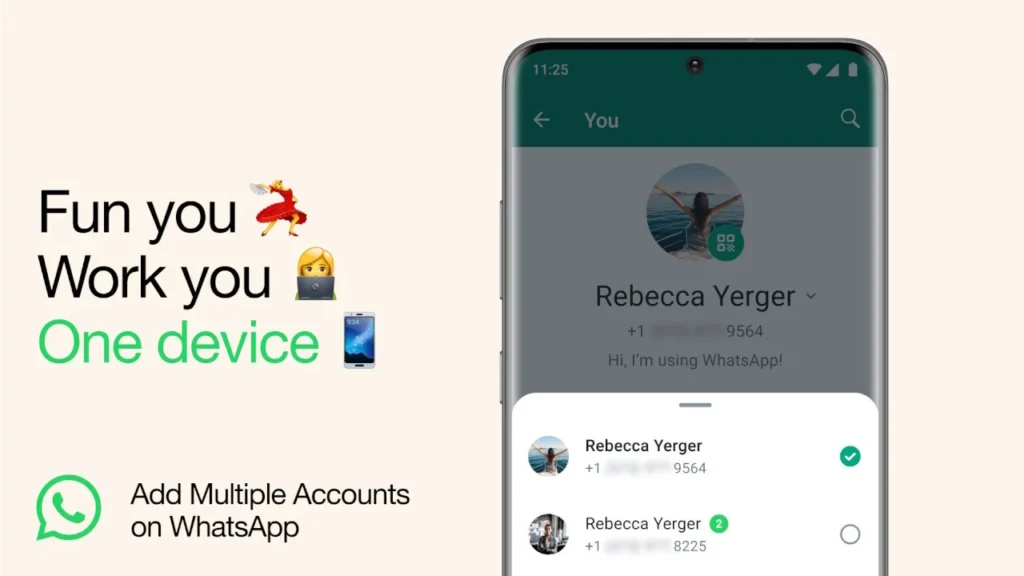
Method 1: Official Multi-Account Feature (Recommended – Same App, No Extra Downloads)
This is the cleanest way. Works on the latest WhatsApp version (update from Play Store or App Store).
Steps to Add a Second Account (Android & iOS):
- Open WhatsApp (make sure it’s updated to the latest version).
- Go to Settings (gear icon on Android / bottom-right on iOS).
- Tap the arrow/down icon next to your name/profile picture (or look for “Add account” / “Accounts” section).
- Select Add account.
- Choose one of the options:
- Register a new number → Enter your second phone number (international format, e.g., +92 for Pakistan) → Verify with SMS/code.
- Add an existing account → If the second number is already on WhatsApp (e.g., on another phone), scan the QR code from that device or follow prompts.
- Wait for verification → Your second account is now added!
- WhatsApp will ask to restore chats if backups exist (Google Drive for Android / iCloud for iOS).
How to Switch Between Accounts:
- Tap the arrow/down icon next to your profile in Settings.
- Or swipe down from the top of the chats list (some versions show account switcher).
- Select the other account → It loads instantly with separate chats, status, media, and settings.
Customization Per Account:
- Unique profile picture, name, about
- Different notification tones/sounds
- Separate privacy settings (who sees last seen, profile photo, etc.)
- Independent backups and media storage
Note: Idle accounts still show notifications (e.g., new messages arrive even if you’re on the other account). Maximum: 2 accounts per device.
Method 2: WhatsApp + WhatsApp Business (Still Works Great as Backup)
If the native multi-account isn’t available yet on your device (rare in 2026), or you want more than two accounts:
- Download WhatsApp Business (free from Play Store / App Store).
- Register your second number in WhatsApp Business.
- Both regular WhatsApp (first number) and WhatsApp Business (second number) run side-by-side.
Pros: Business version has extra features like quick replies, labels, away messages.
Cons: Slightly different interface; some prefer the uniform look of native multi-account.
Method 3: Built-in Dual Apps / App Cloning (Android Only – For Extra Accounts)
Many Android phones (Samsung, Xiaomi, Oppo, Vivo, Realme, etc.) have a native “Dual Apps”, “App Twin”, “Clone App”, or “Parallel Space” feature:
- Go to phone Settings → Apps → Dual Apps / Clone apps (name varies by brand).
- Enable clone for WhatsApp.
- A second WhatsApp icon appears → Register your second number there.
This gives you a completely separate instance (useful for 3+ accounts, but not recommended for security).
Warning: Avoid third-party cloners (Parallel Space, Multi Parallel, etc.) — they can be risky for privacy and bans.
Common Issues & Fixes (2026)
- Feature not showing? Update WhatsApp → Restart phone → Check again. Rollout is complete for most regions.
- Verification code not coming? Ensure the SIM is active → Try “Call me” option → Check network.
- Notifications confusing? Customize tones per account in Settings > Notifications.
- Storage double? Chats and media are separate, so yes — manage space carefully.
- iOS users: If still not rolled out (unlikely now), use WhatsApp Business as fallback.
Final Thoughts
In 2026, using two WhatsApp accounts on one phone is officially supported, secure, and seamless — no hacks needed. Just grab a second SIM (or eSIM), add the account, and switch effortlessly. It’s perfect for dual-SIM users in Pakistan who juggle personal and work life.
Have you set up dual WhatsApp yet? Which method worked best for you — native multi-account or WhatsApp Business? Share in the comments!
Stay connected smartly!