IPS vs AMOLED vs Retina – Screen Technologies Explained in Detail
When buying a smartphone, one of the most important factors is the display quality. You often see terms like IPS, AMOLED, and Retina — but what do they actually mean?
In this detailed guide, we’ll break down:
- What IPS display is
- What AMOLED display is
- What Retina display means
- Key differences
- Which one is better for you
Let’s simplify everything.
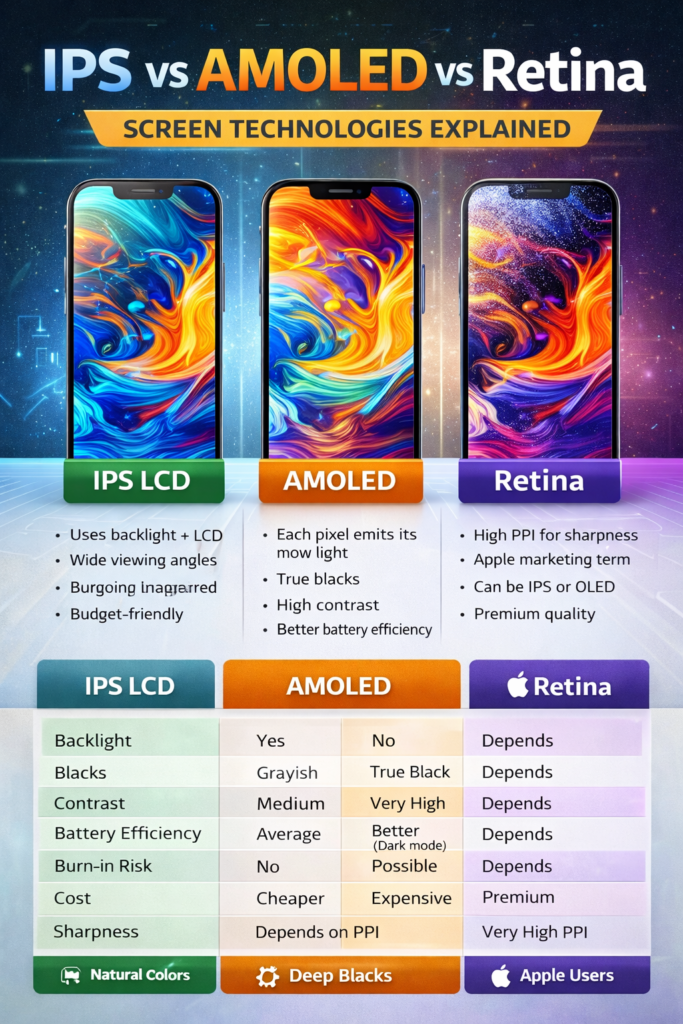
1) What is IPS Display?
IPS stands for In-Plane Switching. It is an advanced version of LCD (Liquid Crystal Display) technology.
IPS displays are widely used in budget and mid-range smartphones.
🔹 How IPS Works
IPS screens use:
- A backlight
- Liquid crystals
- Color filters
The backlight is always ON, and liquid crystals control how much light passes through.
🔹 Advantages of IPS
✅ Natural and accurate colors
✅ Wide viewing angles
✅ Usually cheaper
✅ No burn-in issues
🔹 Disadvantages of IPS
❌ Blacks are not truly black (they look grayish)
❌ Lower contrast ratio
❌ Slightly thicker display panel
IPS displays are common in brands like Xiaomi, Realme, and Motorola in their budget lineup.
2) What is AMOLED Display?
AMOLED stands for Active Matrix Organic Light Emitting Diode.
It is one of the most advanced display technologies in smartphones today.
🔹 How AMOLED Works
Unlike IPS:
- There is NO backlight.
- Each pixel produces its own light.
- Pixels can turn completely OFF.
This allows:
- True black colors
- Infinite contrast ratio
🔹 Advantages of AMOLED
✅ Deep blacks
✅ High contrast
✅ More vibrant colors
✅ Better battery efficiency (especially in dark mode)
✅ Thinner and flexible panels
🔹 Disadvantages of AMOLED
❌ More expensive
❌ Risk of burn-in (image retention)
❌ Colors can look oversaturated
AMOLED displays are widely used in phones from Samsung, OnePlus, and many premium models from Vivo.
3) What is Retina Display?
Retina Display is NOT a display technology.
It is a marketing term created by Apple.
🔹 What Does Retina Mean?
Retina means:
The pixel density is so high that the human eye cannot distinguish individual pixels at normal viewing distance.
It usually refers to:
- High PPI (Pixels Per Inch)
- Sharp text
- Very clear images
Retina displays can be:
- IPS-based (like older iPhones)
- OLED-based (like newer iPhones)
For example:
- iPhone 11 uses Liquid Retina (IPS LCD)
- iPhone 14 Pro uses Super Retina XDR (OLED)
So Retina describes sharpness, not the panel type.
IPS vs AMOLED vs Retina – Quick Comparison
| Feature | IPS LCD | AMOLED | Retina |
|---|---|---|---|
| Backlight | Yes | No | Depends |
| Blacks | Grayish | True Black | Depends |
| Contrast | Medium | Very High | Depends |
| Battery Efficiency | Average | Better (Dark mode) | Depends |
| Burn-in Risk | No | Possible | Depends |
| Cost | Cheaper | Expensive | Premium |
| Sharpness | Depends on PPI | Depends on PPI | Very High PPI |
Which Display is Better?
It depends on your usage.
For Gaming & Media
➡ AMOLED is better (deep blacks + punchy colors)
For Reading & Natural Colors
➡ IPS is good and easier on the eyes
For Apple Users
Retina ensures sharpness, but the actual panel can be IPS or OLED.
Battery Impact Comparison
- IPS uses constant backlight → consumes steady power.
- AMOLED turns off black pixels → saves battery in dark mode.
- Retina has no battery advantage by itself (depends on IPS or OLED).
Budget vs Premium
- Budget Phones → Mostly IPS
- Mid-range → AMOLED becoming common
- Premium → Mostly AMOLED / OLED
Final Verdict
✔ IPS = Affordable, reliable, natural colors
✔ AMOLED = Premium look, deeper blacks, better contrast
✔ Retina = Apple’s branding for very sharp displays
If you want:
- Best contrast & cinematic experience → Go AMOLED
- Budget and stable performance → IPS is fine
- Apple ecosystem → Retina (IPS or OLED)