Multi-Touch Technology Explained in Detail – What is Multitouch?
If you’re using a modern smartphone, tablet, or laptop, you’re interacting with multi-touch technology every single day. From pinch-to-zoom to gaming controls, multitouch has completely transformed how we use digital devices.
In this detailed guide, we’ll explain:
- 📱 What multitouch is
- 🧠 How it works
- 🔍 Types of touch technologies
- 📊 Advantages & limitations
- 🚀 Real-world applications
What is Multi-Touch Technology?
Multi-touch is a touch-sensitive technology that allows a screen to detect and respond to two or more simultaneous touch points.
Before multitouch, screens could only detect one touch at a time (single-touch). Multi-touch enables gestures like:
- Pinch to zoom
- Two-finger scroll
- Rotate image
- Multi-finger gaming controls
- Three-finger screenshots
This innovation made smartphones and tablets far more intuitive.
History of Multi-Touch
Multi-touch research started in the 1980s, but it became mainstream after the launch of the original iPhone by Steve Jobs in 2007. Apple popularized gestures like pinch-to-zoom, making multitouch a standard feature in modern devices.
Today, almost every smartphone, tablet, and laptop supports multi-touch input.
How Multi-Touch Technology Works
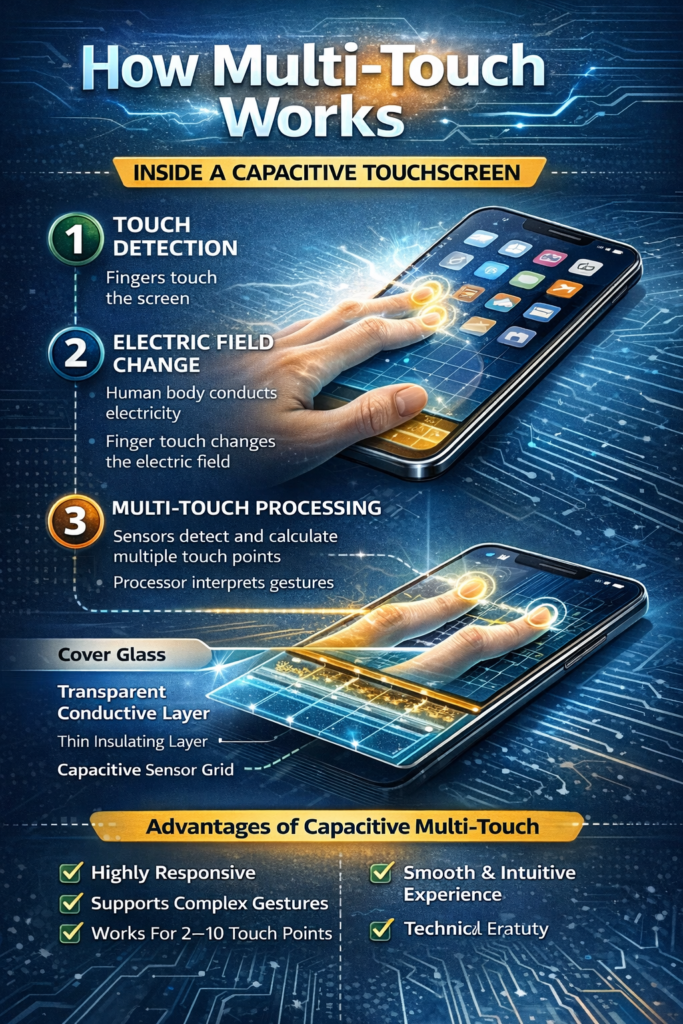
Multi-touch works using special touch-sensitive layers placed over the display. The screen detects changes in electrical signals or light patterns when you touch it.
There are mainly three technologies used:
1) Capacitive Touch Technology (Most Common)
Used in almost all smartphones today.
How It Works:
- The screen has a transparent conductive layer.
- Your finger conducts electricity.
- When you touch the screen, it changes the electrical field.
- The device calculates the touch position.
✔ Supports multi-touch
✔ Highly responsive
✔ Smooth gestures
This is what most Android phones and iPhones use.
2) Resistive Touch Technology
Older technology found in early touchscreen devices.
How It Works:
- Two thin layers are separated by a small gap.
- Pressing the screen connects the layers.
- The device detects the pressure point.
❌ Usually supports single touch
✔ Works with stylus
❌ Less accurate than capacitive
3) Infrared & Optical Touch
Used in large displays, kiosks, and smartboards.
How It Works:
- Infrared sensors surround the screen.
- When your finger blocks the light beam, the position is detected.
✔ Works with gloves
✔ Can detect multiple touches
✔ Used in interactive displays
Common Multi-Touch Gestures
| Gesture | Function |
|---|---|
| Pinch | Zoom out |
| Spread | Zoom in |
| Two-finger swipe | Scroll |
| Rotate | Rotate image |
| Three-finger tap | Screenshot (varies by OS) |
These gestures are now standard in:
- Smartphones
- Tablets
- Touchscreen laptops
- Smart TVs
Multi-Touch in Different Devices
Smartphones
All modern Android and iOS devices support 5–10 touch points simultaneously.
Tablets
Support advanced gestures for productivity and drawing.
Laptops
Touchpads and touchscreens allow multi-finger gestures for navigation.
Gaming
Many mobile games require 3–5 simultaneous touches for movement + action controls.
Advantages of Multi-Touch Technology
✅ Natural and intuitive interaction
✅ Faster navigation
✅ Improved gaming experience
✅ Better creative tools (drawing, editing)
✅ No keyboard or mouse needed
Limitations of Multi-Touch
❌ Doesn’t work well with regular gloves (except special touch gloves)
❌ Can have accidental touches (palm rejection needed)
❌ Higher manufacturing cost
Multi-Touch vs Single Touch
| Feature | Single Touch | Multi-Touch |
|---|---|---|
| Number of inputs | One | Two or more |
| Gesture support | Limited | Advanced |
| Gaming support | Basic | Complex |
| Modern usage | Rare | Standard |
Future of Multi-Touch
The future includes:
- Advanced gesture recognition
- Haptic feedback (touch with vibration response)
- Air gesture control
- Foldable multi-touch displays
Multi-touch will continue evolving with AR, VR, and AI-powered interfaces.
Final Verdict
Multi-touch technology changed how humans interact with digital devices. It replaced physical keyboards and buttons with natural gestures, making devices faster and more intuitive.
Without multi-touch, modern smartphones would not feel “smart.”