SD Cards and microSD Cards Explained: Types, Speed Classes, and What You Need in 2026
In 2026, whether you’re expanding storage on your Android phone (Xiaomi, Samsung, Infinix), recording 4K/8K video on a GoPro or drone, using a dashcam in Islamabad traffic, or storing Nintendo Switch 2 games, SD cards (and especially microSD cards) remain essential. But with all the markings—C10, U3, V30, A2, UHS-I/II, SDXC—the labels can feel confusing.
This detailed guide explains everything: the main types of SD/microSD cards (by capacity and form factor), the different speed classes (what they guarantee), bus interfaces (UHS-I vs UHS-II), application performance (A1/A2), and how to choose the right one for your use case in Pakistan.
SD Card vs microSD Card: The Basics
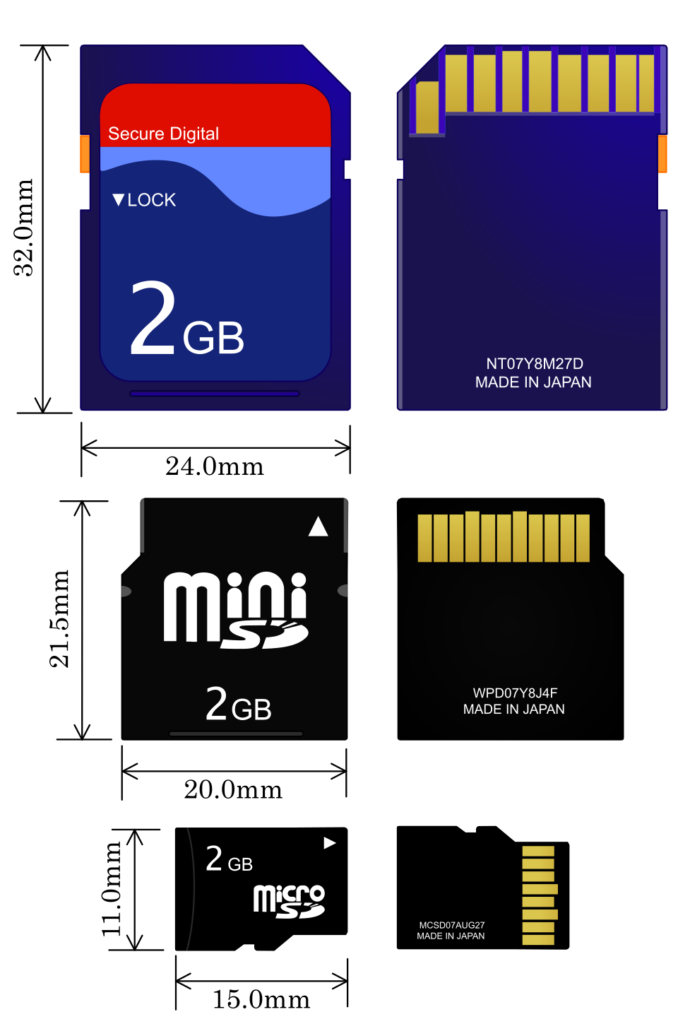
- SD cards (full-size): Larger rectangular cards (32×24 mm). Used in DSLRs, laptops, camcorders.
- microSD cards (also called TF cards): Tiny (15×11 mm). The dominant format for phones, tablets, action cams, drones, Nintendo Switch, Raspberry Pi, dashcams, and security cameras.
Virtually all modern “microSD” cards follow the same standards as full-size SD cards (same speed classes, capacities, etc.). The main differences are physical size and adapters (microSD → full SD via adapter).
Capacity Types: SD vs SDHC vs SDXC vs SDUC
The SD Association defines capacity tiers:
- SD (Standard Capacity): Up to 2 GB — obsolete in 2026.
- SDHC (High Capacity): 4 GB – 32 GB — still common for budget uses.
- SDXC (eXtended Capacity): 64 GB – 2 TB — the most popular today (128 GB, 256 GB, 512 GB, 1 TB common).
- SDUC (Ultra Capacity): 2 TB – 128 TB — emerging in 2026, rare and expensive for consumer use.
Most phones and devices in Pakistan support microSDXC up to 1–2 TB (check your model—e.g., Samsung Galaxy A-series often caps at 1 TB).
Speed Classes Explained: What the Symbols Really Mean
Speed classes guarantee minimum sustained write speed (critical for video recording—no dropped frames). Higher classes support higher resolutions and bitrates.
There are four main speed rating systems (all backward compatible):
- Speed Class (C) — Original standard (circle with number)
- C2: ≥2 MB/s
- C4: ≥4 MB/s
- C6: ≥6 MB/s
- C10: ≥10 MB/s In 2026, almost every card is at least C10. Lower ones are rare except in very cheap/old stock.
- UHS Speed Class (U) — For UHS bus cards (U inside circle)
- U1: ≥10 MB/s (same as C10)
- U3: ≥30 MB/s U3 is the modern baseline for 4K video and burst photography.
- Video Speed Class (V) — Designed for high-res video (V + number)
- V6: ≥6 MB/s
- V10: ≥10 MB/s
- V30: ≥30 MB/s (most common for 4K/60fps)
- V60: ≥60 MB/s (8K, high-bitrate 4K)
- V90: ≥90 MB/s (pro 8K/120fps, RAW bursts) V30+ often requires UHS-II hardware for full performance.
- SD Express Speed Class (E) — Newest (2020s onward, NVMe-like speeds)
- E150, E300, E450, E600 — up to 600 MB/s+ (PCIe/NVMe interface) Rare in consumer cards in 2026; mostly for future high-end cameras/drones.
Quick cheat sheet:
| Class | Min Write Speed | Best For | Common In 2026? |
|---|---|---|---|
| C10 / U1 / V10 | 10 MB/s | Full HD video, photos | Yes (budget) |
| U3 / V30 | 30 MB/s | 4K video, burst shooting | Standard |
| V60 | 60 MB/s | 8K, high-bitrate 4K | Mid-high end |
| V90 | 90 MB/s | Pro video, RAW bursts | High-end |
| E300+ | 300+ MB/s | Future ultra-fast applications | Emerging |
UHS Bus Interface: UHS-I vs UHS-II vs UHS-III
The Roman numeral (I, II, III) shows the bus speed (max theoretical transfer):
- UHS-I: Up to 104 MB/s (one row of pins). Most cards in 2026.
- UHS-II: Up to 312 MB/s (two rows of pins). Faster transfers; backward compatible.
- UHS-III: Up to 624 MB/s (three rows). Rare.
Higher UHS needs matching reader/device to hit max speeds.
Application Performance Class: A1 and A2 (For Phones & Apps)
These guarantee random read/write speeds (important for running apps/games from the card, not just sequential video).
- A1: ≥1500 IOPS read, ≥500 IOPS write + ≥10 MB/s sustained write.
- A2: ≥4000 IOPS read, ≥2000 IOPS write + ≥10 MB/s sustained write.
A1/A2 cards are best for Android Adoptable Storage or running apps directly from the microSD.
How to Choose the Right microSD Card in 2026 (Pakistan Tips)
- Phone expansion (Android): 128–512 GB, A1/A2, U3/V30 minimum.
- Action cam/Drone (GoPro, DJI): V30 minimum, V60+ for 4K/60+ or 8K.
- Dashcam/Security cam: High-endurance cards (e.g., SanDisk High Endurance), V30/U3.
- Nintendo Switch 2: 256–1 TB, U3/V30 or better.
- Cameras (DSLR/mirrorless): UHS-II V60/V90 for burst/4K.
Popular brands in Islamabad (Daraz, local shops): SanDisk Extreme, Samsung EVO Select, Kingston Canvas Go!, Lexar Professional.
Budget tip: A 256 GB U3/V30/A2 card costs ~Rs. 4,000–7,000; 1 TB ~Rs. 12,000–20,000.
Final Thoughts
SD/microSD speed classes ensure reliable performance—no more dropped frames mid-recording. In 2026, look for U3 + V30 + A2 on microSDXC cards for most uses—it’s the sweet spot for phones, cameras, and gaming handhelds.
Check your device’s manual for max supported capacity/speed. Fake/counterfeit cards are common in Pakistan markets—buy from trusted sellers and check authenticity via apps.
What microSD are you using right now? For phone, camera, or something else? Share in the comments—happy to recommend based on your setup!