The Digital Breadcrumbs: What Are Cookies, Really?
Imagine walking into your favorite local coffee shop. The barista sees you, remembers your name, and already knows you want a medium oat-milk latte with an extra shot. You didn’t have to explain your history or preferences again—they just knew.
In the world of web browsing, HTTP cookies are the Baristas of the internet. They are small pieces of data that websites store on your device to remember who you are and what you’ve been doing.
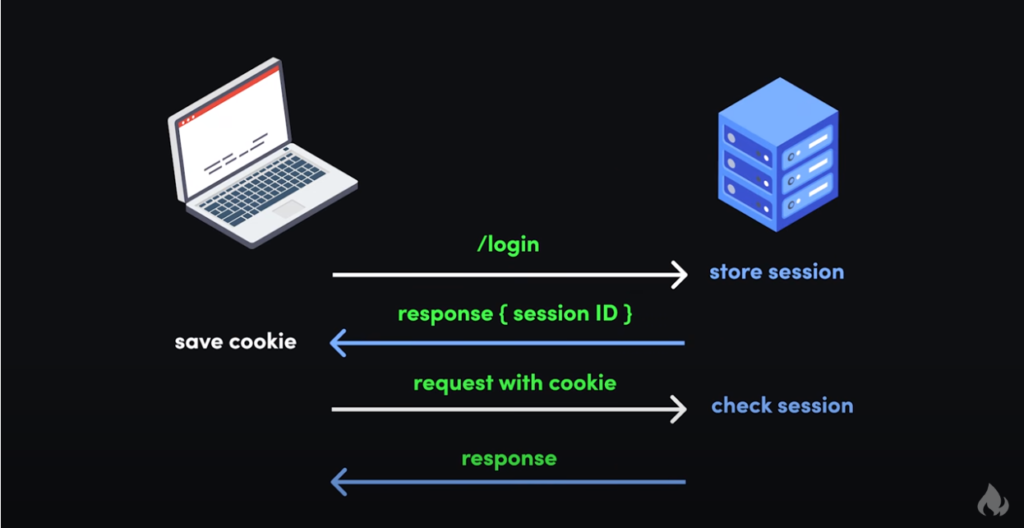
How Cookies Work: The Technical Handshake
When you visit a website, the server sends a tiny text file to your browser. Your browser stores this file locally. The next time you visit that same site, your browser “hands” that file back to the server, saying, “Hey, remember me? Here is my ID.”
This simple exchange is what allows the internet to feel personal rather than a series of disconnected, anonymous interactions. Without cookies, every time you clicked a new page on a shopping site, the website would “forget” who you are, and your shopping cart would instantly empty.
The Different Flavors of Cookies
Not all cookies serve the same purpose. They are generally categorized by how long they last and who put them there.
1. By Duration
- Session Cookies: These are temporary. They only last as long as your browser is open. Think of them like a visitor’s badge that you hand back when you leave the building. They are used for things like keeping you logged in while you navigate different pages of a site.+1
- Persistent Cookies: These stay on your device for a set period (days, months, or even years). They remember things like your login credentials, your language preferences, or the “dark mode” setting you chose last year.+1
2. By Origin
- First-Party Cookies: These are set by the website you are actually visiting. Generally, these are “good” cookies that make the site function correctly.
- Third-Party Cookies: These are set by a domain other than the one you are on. If you are reading a news site but see an ad for shoes you looked at yesterday, that’s a third-party cookie. These are primarily used for tracking and targeted advertising.+1
What’s Inside a Cookie?
If you were to open a cookie file (which is just a .txt file), you wouldn’t see your name or address in plain text. Instead, you’d see a string of attributes:
- Name & Value: A unique ID (e.g.,
user_id=82910). - Expiration Date: When the cookie should be deleted.
- Domain: Which website the cookie belongs to.
- Path: Which specific pages on that site can access the cookie.
- Security Flags: Like
Secure(only sent over HTTPS) orHttpOnly(preventing scripts from stealing the cookie).
The Privacy Debate: Are Cookies Dangerous?
Cookies themselves aren’t malware. They cannot “spy” on your files or spread viruses. However, they are the primary tool used for cross-site tracking.
Over the last decade, privacy laws like the GDPR and CCPA have forced websites to be transparent. This is why you now see “Accept Cookies” banners on almost every site you visit.
Pro Tip: In 2026, most modern browsers have moved toward “Privacy Sandbox” models or “Tracking Protection” that automatically block the most intrusive third-party cookies while keeping the functional first-party ones active.
Managing Your Digital Trail
You have total control over your cookies. You can:
- Clear them: Every browser allows you to “Clear Cache and Cookies” to reset your digital footprint.
- Go Incognito: Private browsing modes automatically delete all cookies as soon as you close the window.
- Block Third-Party: Most browsers have a setting to “Block Third-Party Cookies,” which lets you stay logged into sites while preventing advertisers from following you around the web.
Cookies are what make the modern web convenient, but like real cookies, it’s all about balance. Knowing what they are helps you enjoy the convenience without sacrificing your privacy.