USB is everywhere — phones, laptops, power banks, printers, gaming consoles, and even cars. But many people still get confused between USB-A, USB-B, USB-C, USB 2.0, USB 3.0, USB 4, Thunderbolt, PD, and more.
In this complete guide, we’ll explain USB types, versions, speeds, power delivery, and which one you should use in 2026.
1) What Is USB?
USB (Universal Serial Bus) is a standard used for:
- Data transfer
- Charging devices
- Connecting peripherals
USB was introduced in 1996 to replace multiple ports with one universal standard.
2) USB Connector Types (Physical Shapes)
This is where most confusion happens.
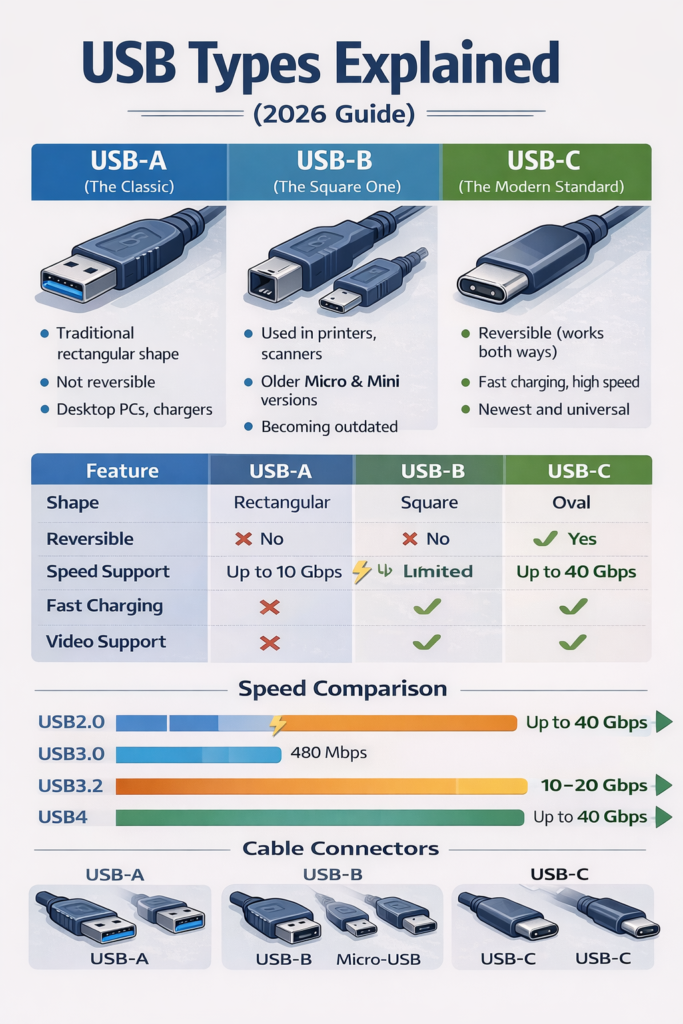
USB-A (The Classic Port)
USB-A is the traditional rectangular port we’ve used for years.
Where You See It:
- Desktop PCs
- TVs
- Chargers
- Power banks
Features:
- Not reversible
- Large rectangular shape
- Supports USB 2.0, 3.0, 3.1
Limitation:
- Being replaced by USB-C in modern devices
USB-B (The Square One)
USB-B is mostly used for larger devices.
Where You See It:
- Printers
- Scanners
- Audio interfaces
It has a square shape with slightly beveled corners.
There are also smaller versions:
- Mini-USB
- Micro-USB (common in older Android phones)
USB-B is slowly becoming outdated.
USB-C (The Modern Standard)
USB-C is the newest and most powerful USB connector.
Key Features:
- Reversible (works both ways)
- Small and compact
- Supports fast charging
- Supports high-speed data
- Supports video output
USB-C is now used in:
- Apple iPhones (new models)
- Samsung Galaxy phones
- Dell laptops
- HP laptops
- Google Pixel devices
In 2026, USB-C is the universal standard.
3) USB Versions (Speed Differences Explained)
Now let’s talk about versions — this determines speed.
USB 2.0
- Speed: 480 Mbps
- Very old
- Used in keyboards, mice
USB 3.0 (Also called USB 3.2 Gen 1)
- Speed: 5 Gbps
- 10x faster than USB 2.0
USB 3.1 / 3.2 Gen 2
- Speed: 10 Gbps
USB 3.2 Gen 2×2
- Speed: 20 Gbps
USB4
- Speed: Up to 40 Gbps
- Based on Thunderbolt technology
- Supports high-speed storage & displays
4) Important: Connector Type vs Version
Very important:
USB-A, B, C = Physical shape
USB 2.0, 3.0, 4 = Speed version
Example:
- You can have USB-A with USB 3.0
- You can have USB-C with USB 2.0
- USB-C does NOT automatically mean fastest speed
Always check specifications.
5) USB Power Delivery (Charging Explained)
Modern USB supports charging.
USB Power Delivery (PD)
USB PD allows:
- 18W
- 30W
- 45W
- 65W
- 100W+
- Even 240W (new standard)
This is why USB-C can charge:
- Smartphones
- Tablets
- Laptops
- Gaming consoles
6) USB-C Can Do More Than Charging
USB-C supports:
Video Output
Using DisplayPort Alt Mode:
- Connect to monitor
- Connect to TV
Data + Power + Video in One Cable
One cable can:
- Charge laptop
- Transfer data
- Connect to external display
7) Thunderbolt vs USB-C
Thunderbolt uses the USB-C connector but offers:
- 40 Gbps speed
- External GPU support
- Multiple 4K display support
Thunderbolt is commonly seen in premium laptops.
8) Color Codes Explained
Inside USB-A ports, you may see colors:
- Black → USB 2.0
- Blue → USB 3.0
- Red → High power
- Yellow → Always-on charging
But color coding is not always reliable.
9) Cable Quality Matters
Not all USB cables are equal.
Cheap cables may:
- Charge slowly
- Not support fast charging
- Limit data speed
- Overheat
Always buy certified cables.
10) Common USB Mistakes
- Thinking USB-C means fastest speed
- Using old cable with fast charger
- Ignoring power rating
- Buying low-quality cables
Which USB Should You Use in 2026?
For Phones:
USB-C with at least USB 3.0 + PD support
For Laptops:
USB-C with 65W PD
For External SSD:
USB 3.2 or USB4
For Basic Devices:
USB 2.0 is fine
Quick Comparison Table
| Feature | USB-A | USB-B | USB-C |
|---|---|---|---|
| Reversible | ❌ No | ❌ No | ✅ Yes |
| Speed Support | Up to 10 Gbps | Limited | Up to 40 Gbps |
| Fast Charging | Limited | No | Yes |
| Video Support | No | No | Yes |
| Modern Standard | Old | Outdated | Current |
Final Verdict
In 2026:
✔️ USB-C is the future
✔️ USB4 is the fastest
✔️ USB-A is still common
✔️ USB-B is mostly for printers
If you’re buying a new device, always choose USB-C with fast charging and high-speed support.