What is PPI? What Does It Mean? (Pixels Per Inch Explained in Smartphones)
When comparing smartphones, you often see specifications like:
- 1080p display
- 2K display
- 450 PPI
- 320 PPI
But what exactly is PPI (Pixels Per Inch)? And does a higher PPI really mean a better display?
In this detailed guide, we’ll explain:
- 📱 What PPI means
- 🔬 How it is calculated
- 👀 How it affects display quality
- 📊 Ideal PPI range for smartphones
- 🤔 Whether higher PPI actually matters
What is PPI?
PPI (Pixels Per Inch) measures how many pixels are packed into one inch of a display.
In simple terms:
The higher the PPI, the sharper and clearer the screen looks.
A display with:
- 300 PPI → Less dense pixels
- 450 PPI → More tightly packed pixels
- 600+ PPI → Extremely sharp
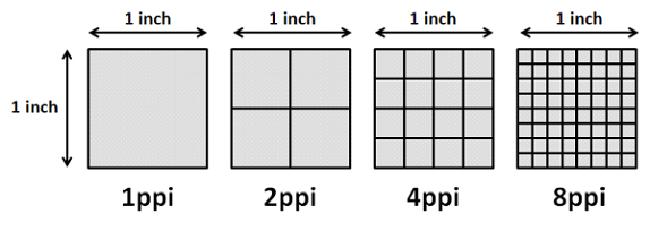
Why PPI Matters in Smartphones
Smartphones are used very close to your eyes (about 10–12 inches away).
Because of this:
- Low PPI = You may see pixel edges
- High PPI = Text and images look smooth
This is especially important for:
- Reading text
- Watching videos
- Gaming
- Viewing photos
How is PPI Calculated?
PPI depends on:
- Screen resolution (width × height)
- Screen size (in inches)
Formula:
[
PPI = \frac{\sqrt{(Width^2 + Height^2)}}{Screen Size}
]
Example:
A 6.5-inch phone with 2400 × 1080 resolution:
- Diagonal pixels ≈ 2630
- 2630 ÷ 6.5 ≈ 404 PPI
So even two phones with the same resolution can have different PPI if their screen sizes differ.
Resolution vs PPI (Important Difference)
Many people confuse resolution with PPI.
| Feature | Resolution | PPI |
|---|---|---|
| What it measures | Total number of pixels | Pixel density |
| Example | 1080 × 2400 | 450 PPI |
| Affects | Detail amount | Sharpness level |
A large screen with high resolution may still have lower PPI than a smaller screen.
What is “Retina Display”?
The term “Retina Display” was popularized by Apple.
It means:
Pixel density is high enough that the human eye cannot distinguish individual pixels at normal viewing distance.
Generally:
- Around 300–400 PPI is considered “Retina-level” for smartphones.
Ideal PPI Range for Smartphones
| PPI Range | Display Quality |
|---|---|
| Below 250 | Pixelation visible |
| 300–350 | Good quality |
| 400–450 | Very sharp |
| 500+ | Extremely sharp |
| 600+ | Overkill for most users |
Most modern smartphones today range between 380–500 PPI.
Does Higher PPI Always Mean Better?
Not always.
After a certain point:
- Your eyes cannot notice the difference.
- Battery consumption increases.
- GPU workload increases.
For example:
A 1080p display at 400–450 PPI is already very sharp for daily use.
Moving to 600 PPI may not give visible improvement but may reduce battery life.
PPI vs Viewing Distance
The closer you hold your phone, the more important PPI becomes.
At normal viewing distance:
- 350–450 PPI is more than enough.
For VR headsets:
- Much higher PPI is required because screens are very close to eyes.
PPI in Budget vs Flagship Phones
- Budget phones → 270–350 PPI
- Mid-range phones → 380–420 PPI
- Flagship phones → 450–500+ PPI
Higher PPI usually comes with:
- AMOLED displays
- Higher resolution (2K / QHD+)
- Higher price
Does PPI Affect Gaming?
Indirectly, yes.
Higher resolution = Higher GPU load.
So:
- Higher PPI screens may consume more battery during gaming.
- Performance can be slightly lower on very high-resolution displays.
Some phones allow switching resolution (1080p / 1440p) to save battery.
Common Misconceptions
❌ “More resolution always means sharper screen.”
✔ Not true. Screen size matters.
❌ “You need 600+ PPI for a good display.”
✔ Not necessary for normal use.
❌ “Low PPI only affects video.”
✔ It affects text clarity too.
Final Verdict
PPI determines how sharp and crisp your smartphone display looks.
For most users:
👉 400–450 PPI is the sweet spot.
👉 Above 500 PPI is great but not essential.
👉 Below 300 PPI may show visible pixelation.
When buying a phone, don’t just look at resolution — check the PPI and screen size together.