WhatsApp Communities Feature: Organizing Your Groups Like Never Before
Launched back in late 2022 and fully rolled out globally by 2023, WhatsApp Communities remains one of the platform’s most powerful tools for managing larger-scale conversations — especially useful in places like Pakistan and India where family, neighborhood, school, mosque, office, or hobby groups multiply quickly.
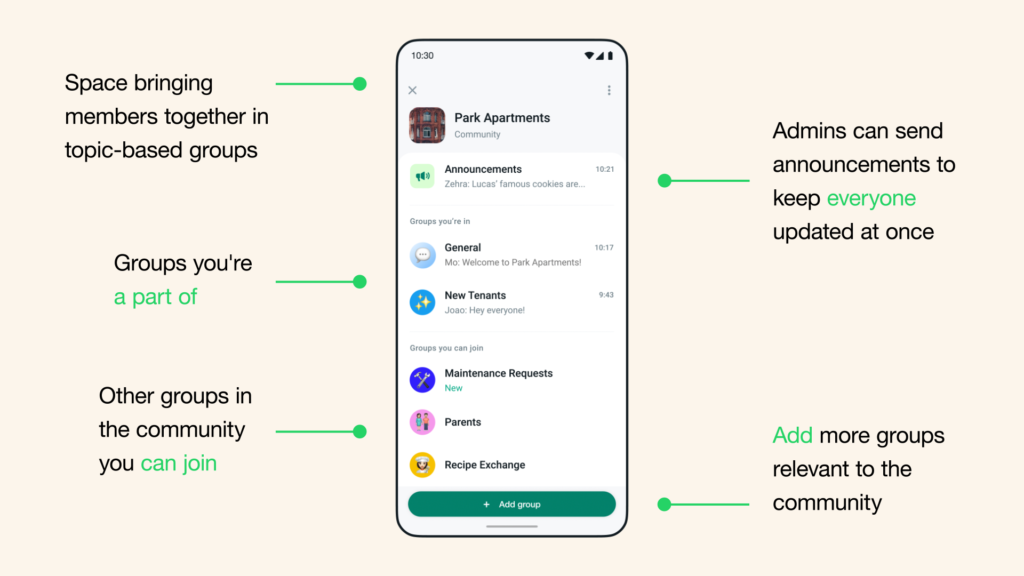
As of February 2026, the core Communities feature hasn’t seen major overhauls recently (the spotlight has been on group chat enhancements like Group Message History rolling out today, February 20, 2026), but it continues to be a game-changer for structured, scalable chatting. Here’s everything you need to know about how it works, why it’s great, and tips to make the most of it in Rawalpindi or anywhere else.
What Are WhatsApp Communities?
Communities act like a “super folder” or hub that brings multiple related groups together under one umbrella.
- A single Community can include up to 50 groups (plus the mandatory Announcement group).
- Each group inside can have up to 1,024 members (WhatsApp’s standard group limit).
- That means one Community can theoretically connect tens of thousands of people around a shared interest or affiliation.
Key structure:
- Announcement Group — Auto-created when you start a Community. Only admins can post here. Perfect for broadcasting important updates, rules, events, or reminders to every member across all linked groups. No replies allowed — keeps it clean and spam-free.
- Linked Groups — These are the discussion spaces. You can create new ones or add existing groups (with admin approval). Members can chat freely here about specific topics.
- Community Home — A dedicated tab (three-people icon) where you see all your Communities, unread messages, and announcements at a glance.
How to Create or Join a Community
Creating one (anyone can do it):
- Open WhatsApp → Tap the Communities tab (or the new Communities section in chats on some versions).
- Tap “Start your community” or “+” icon.
- Add a name, description, and profile photo (e.g., “Rawalpindi Cricket League” 🏏).
- Create or add groups — WhatsApp guides you through it.
- Invite members via link, QR code, or directly from contacts.
Joining:
- Get invited by an admin (they can add you to the Community and auto-add you to groups).
- Or join via public invite links shared on social media, WhatsApp channels, or forums.
Note: You can’t create Communities in the WhatsApp Business app yet.
Why Communities Are So Useful in 2026
In regions like Punjab, Pakistan — where group chats for family events, neighborhood watch, school PTAs, tuition classes, or local sports leagues are everywhere — Communities solve real pain points:
- One place for everything — No more digging through 20 separate family or mohalla groups. Everything related (e.g., “Islamabad-Rawalpindi University Alumni”) lives in one hub.
- Controlled broadcasting — Admins send key info (exam dates, wedding invites, load-shedding updates, or charity drives) without cluttering discussion groups.
- Better organization — Sub-groups keep topics focused: one for general chat, one for event planning, one for buying/selling, etc.
- Privacy & control — Members can mute individual groups, leave specific ones without exiting the whole Community, and admins manage membership tightly.
- Scalable for big networks — Schools, mosques, residential societies, sports clubs, or even small businesses use it to connect hundreds without chaos.
Recent group-level upgrades (like Member Tags, Text Stickers, Event Reminders from early 2026, and today’s Group Message History) make Communities even smoother — new joiners can quickly catch up on context without endless “What did I miss?” messages.
Limitations to Know
- No end-to-end encryption for the Community overview itself (but all chats inside groups and announcements remain encrypted).
- You can’t reply in the Announcement group (intentional to avoid spam).
- Maximum 50 groups per Community.
- Not ideal for super-casual 1:1 or tiny friend circles — stick to regular groups there.
Final Thoughts
If you’re juggling multiple groups for family, work, locality, or hobbies in Rawalpindi, Communities can dramatically reduce notification overload and make staying connected feel more organized and less overwhelming.
Many local Communities (neighborhood watches, tuition batches, or cricket teams) already thrive on this feature. Have you tried setting one up or joining any? What’s your go-to use case — family mega-group, office coordination, or something else?
Share in the comments, and if you’re new to it, update WhatsApp and give the Communities tab a spin today! 📱👥
(Info based on official WhatsApp Help Center and recent 2026 updates as of February 20, 2026.)